Waiting for the Shift in Numbers

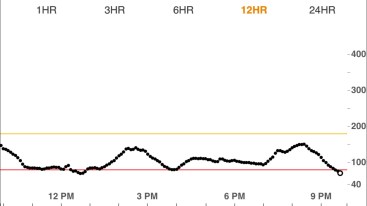
Call me crazy, but sometimes, I find myself staring at my Dexcom app in anticipation of catching the numbers changing.

It might be because I’m hoping for a change (coming down from a high, coming up from a low). Or it could be because I find a strange satisfaction in receiving real-time data of my blood sugar levels. Whatever, so be it: I’m a diabetes nerd!

I remember this particular example bringing me happiness, because I’d been hovering pretty close to my high limit (170 mg/dL) for a couple hours. So watching that three-point shift happen reassured me that I was going to come down. And sure enough, 15 minutes after capturing these screenshots, I was going down closer to my target of 100.

When it comes to diabetes…it’s the little things, right? Am I the only one who likes monitoring my CGM this closely, every once in a while? Or am I just weird?

Maybe don’t answer that last question…
Memory Monday: 1st Generation Dexcom CGMs

One Monday per month, I’ll take a trip down memory lane and reflect on how much diabetes technology, education, and stigma has changed over the years. Remember when…

…Dexcom CGMs made their debut?

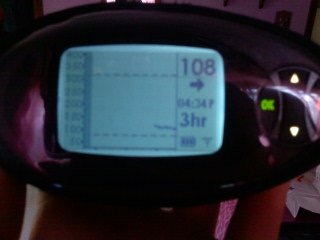
It was just over ten years ago that the Dexcom SEVEN CGM System launched. I didn’t actually know more about it, though, until a couple years after the fact. That was when my endocrinologist encouraged me to sign up for a week-long trial run with this new technology to see how I liked it.

023E152D-A6FF-4555-80F0-67764C9523BB
Then: The Dexcom SEVEN CGM System

I didn’t like it, I LOVED it. I quickly became obsessed with the ability to monitor my blood sugar levels at all times. But it’s funny to think back to how bulky and just plain different that first-generation system was compared to today’s sleek and highly functional models.

A few key differences between now and then:

  • Size. The first CGM was large. It was roughly the size of my OmniPod PDM, which might not seem so significant, but it is when measured up against newer CGM models.
  • Display. The screen on my first CGM was very simple. No colors, no frills – just readings of my blood sugar. That was all fine, but I have to say that I’m a fan of color-coordinated blood sugar reports (red for low, yellow for high, gray for in-range numbers). In a weird way, it motivates me to keep my graph as gray as possible.
  • Distance restrictions. I hated that I had to keep my first CGM so close to me at all times, or else run the risk of losing data! It was hyper sensitive and my readings would be lost if I left the same room as the CGM for more than a couple of minutes. My CGM is now able to pick up readings from much farther away – sometimes, even when I’m downstairs and it’s upstairs.
  • Sounds. My memory is a little foggier on how the sounds compare between old and new Dexcom CGM generations, but I do recall the beeps and vibrations being far more aggressive and annoying on older models.
  • Smartphone access. This might be one of the biggest and best changes – the ability to download an app on your smartphone that can replace a Dexcom receiver. How awesome is that? Plus, if you choose to do so, you can invite family and friends to monitor your blood sugar along with you, which can be helpful in certain situations. Cell phones are so ingrained into society, so this move was brilliant on Dexcom’s part.
IMG_4180
Now: Dexcom data, on my iPhone!

All these improvements have made me a member of Team Dexcom for life. It’ll be neat to see what they come up with next to help make the lives of people with diabetes easier and better.

Diabetes Data Overload

I’ve always been a words girl – never a big fan of numbers. So isn’t my T1D ironic, being that it’s an illness ruled by numbers?

Think about it. PWD have a ridiculous number of…numbers to be concerned about on a daily basis. Between blood sugar checks, insulin dosage calculations, carbohydrate counting, basal rate testing, and more, there’s a lot to take into account.

And as time has gone on and technology has evolved, it seems like these numbers are constantly accessible on an endless volume of devices. I can determine trends using my Dexcom CGM – using either my mobile app or my sparkly pink receiver. I can scroll through my record log of blood sugars on my meter. I can find out how much insulin I took in one day using my OmniPod. I can even download several weeks’ worth of blood sugar graphs from my Dexcom by simply hooking it up to a computer.

It’s information overload.

As much as I love having the ability to access all of this data, it’s also too much to swallow at times. I could drive myself nuts looking through days’ worth of graphs and logs to figure out why I was inexplicably high at 3 o’clock in the morning one day, but I can also just chalk it up to a fluke and better spend my energy worrying about my blood sugar in the present (as opposed to the past).

The point is, it’s exhausting to have my life dictated by all this data. I wish I could take a break from it sometimes, but then again, it’s helped me become more accountable for my own health. And I can still express my hatred for numbers by using my love of words, so it’s not all that bad.