I’m taking a departure from a “traditional” blog post today to tell you, my dear readers, that you should consider celebrating a special holiday with me today: National Selfie Day! Before you roll your eyes at the mere idea of that, please keep reading to learn how participating will help support students with diabetes.
Dexcom has partnered with a nonprofit that is very important to me – The College Diabetes Network (CDN) – to help put some focus on the diabetes community and raise money. They’ve created the #SensorSelfie social media campaign to encourage people with diabetes to take photos of themselves proudly donning their Dexcom sensors.
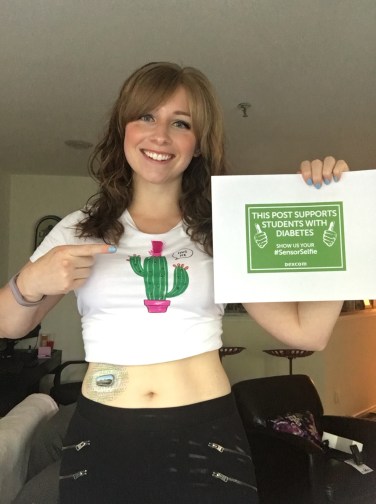
Here’s my #SensorSelfie, which wouldn’t be complete without my cactus shirt.
But what exactly do you need to do in order to take part in the campaign? There’s four simple steps to follow today, June 21st:
Take a picture showing off your Dexcom sensor
Post the photo to your Facebook and Instagram pages
Use the hashtag #SensorSelfie and tag @Dexcom
Tell ALLLLLL your diabuddies to do the same
For every post that uses #SensorSelfie today, Dexcom will donate $1 to CDN. Can you imagine how much money could be raised if you got all the T1Ds you know to participate?
If you’re looking for some more information on this social media campaign, click this link. Otherwise, what are you waiting for? Get to snapping, posting, and tagging!
In Vlog #3, I talk about how frustrating it can be to experience a low blood sugar when trying to do something as simple as run an errand…and what I decided to do about it on a recent trip to a few stores. Watch the video and leave a comment to let me know what you think!
Throughout June and July, I’m going to be a travel fiend. I’ve got plans to travel by plane at least twice, and by car countless times. My trips will vary in length from just a couple hours to eight or nine hours. My head’s spinning just thinking about it, but I’ve got to get it together enough to think about how I can make traveling with diabetes a little bit easier. Given my past travel experience, I can think of four things that are absolute musts for me to take on any trip…
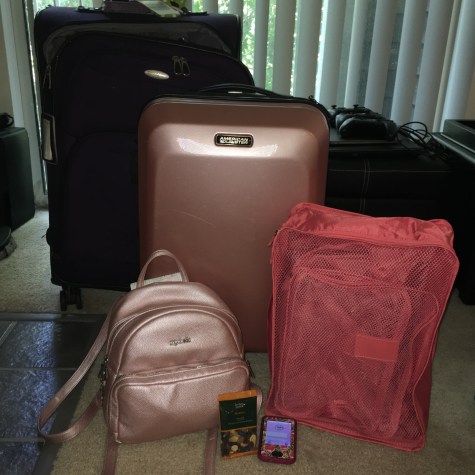
Some of my favorite things to have with me when I travel.
4. Packing cubes
I always thought packing cubes were a total gimmick…until I actually started using them. I got a set of four for Christmas and they’ve really turned me into a much more efficient packer. They help me visualize the space that will be taken up in my suitcases, and what’s even better is that one of the cube’s is the perfect size for my diabetes supplies. I can fit 15-20 pods, a handful of CGM sensors, various device chargers, alcohol swabs, IV prep wipes, and more into the compact little cube. It’s so much better and more organized than the lame-o gallon-size Ziploc bag that used to store all my diabetes supplies for a trip.
3. My Myabetic backpack
I don’t know how I ever traveled with a purse as opposed to my Myabetic backpack. I can fit way more things into my backpack than I ever could put into my purse, and I love that there are specific compartments in the backpack for certain diabetes supplies. I know exactly where things I might need during a flight are stored, eliminating that panicky feeling I used to get when I would dig frantically through my purse in order to find my tube of glucose or my PDM.
2. Snacks and water
This is an obvious one. In my opinion, traveling with diabetes shouldn’t even be attempted without a refillable water bottle or at least two emergency-low-blood-sugar snacks. Even though it’s basically diabetes 101, I’m guilty of going places without water or snacks…and I’ve always regretted it. There’s not much worse than being in an unfamiliar place and unsure of where the closest food and water is located, especially when dealing with a blood sugar crisis.
1. My CGM
The most important tool in my travel kit is, without a doubt, my CGM. More specifically, my receiver is key, particularly when I’m traveling by air. I am religious about turning my phone off for the duration of a flight (just a weird paranoia thing, don’t judge me), so my receiver becomes my go-to whenever I want a status update on my blood sugar without taking out my meter and kit. It helps me handle any weird blood sugar spikes and drops that occasionally happen when I travel, and it provides me with a peace of mind that makes traveling with diabetes much more bearable.
This post originally appeared on Hugging the Cactus on March 21, 2018. I’m republishing it now because of a recent experience I had with my meter reporting inaccurate and inconsistent blood sugar levels. Has this ever happened to you? Drop a comment and let me know.
Blood glucose meters serve the sole purpose of checking current levels of glucose in the blood. Pretty self-explanatory, right? And it’s equally obvious that it’s crucial for all meters to generate accurate results so PWD can make the right treatment decisions based on those numbers.
Unfortunately, though, accuracy isn’t always what I get.
The other day, I was running low before bedtime. I corrected with an organic rice crispy treat (honestly, it was a million times better than the brand name kind). I waited nearly an hour for my blood sugar to come up. When my CGM wasn’t showing any progress, I tested: I was 47. It’s rare for me to be that low, so I tested again. 52. I believed it, especially since I was experiencing several hypoglycemic symptoms.
I chugged a glass of orange juice and plopped down on the couch to wait for signs of improvement. Before long, I was freezing cold – a sure sign I was coming up, because I had been sweating 20 minutes prior. But I didn’t feel comfortable going to bed yet. I wanted to see if my CGM would show an up arrow. When it finally did, I made my way upstairs to brush my teeth and wash my face. In the middle of my routine, though, I decided to glance at my CGM again – and saw the dreaded ??? screen.
I decided then that the Dexcom should be out of commission, a.k.a. not trusted at all, for the remainder of the evening.
I ripped it out and inserted a fresh one, not really caring that it would wake me up in two hours to be calibrated. I would need to set at least two alarms for the middle of the night, anyways, if I decided to go to bed disconnected from my Dex. So it just made sense.
Once that was done, I tested again. I was pretty tired at this point and really didn’t want to have to eat something else, so I did it as quickly as I could. In my haste, I jostled my meter just so – enough that I saw the test strip, already marked with my blood, move slightly as it brushed against my PDM and was placed next to it.
113 mg/dL flashed upon the screen. Normally, I’d be thrilled! But I furrowed my brow. Something just felt…off about that reading. So I tested again.
206.
What?!
I tested a third time – 203. Okay, something was definitely wrong. Either that 113 was wrong (likely) or my meter had just produced two wildly inaccurate blood sugars in a row (less likely).
This is one of the many times that it’s convenient to live with another PWD. I asked my mom if I could borrow her test kit and see what result it generated. Seconds later…a twin 203 popped up on the screen, reassuring me that the 113 was a fluke on my meter.
Relief with the reality and irritation with the technology washed over me simultaneously as I went to correct the high with a bolus. I was glad I wasn’t heading down again, but irked that my meter had failed me. True, it was a bit of human error there, but aren’t we at a point in technological advancements where this sort of thing just shouldn’t happen? I put my life into the “hands” of my meter, Dexcom, and OmniPod. They should produce results that are undoubtedly accurate.
I reached into the front pocket of my sweatshirt. My tube of glucose was there, but nothing else…oh, shit.
My CGM receiver was gone.
“C’mon, pup, we’ve gotta find it,” I said to my canine companion, Clarence. He was all too happy to oblige as we sprinted back up the street to find my receiver.
It couldn’t have gone far…
My anxious eyes scanned all around our surroundings. Surely, my CGM’s bright pink case would pop against the dull browns, grays, and greens that painted the wet landscape.
Where WAS it?
Did I actually leave my house with it in the first place? Or was it still sitting atop my nightstand with my glucometer?
All I knew was that I’d better find it soon…or the chances of it getting run over by a car going at least 40 mph were very good.
Have you ever had your CGM (or any other diabetes device) take off in flight?
Not here, not there…
Really, Clarence, it’d be great if you could help me look for it rather than pick up sticks…
Dammit, what am I going to do if it’s gone for good…
“AHA!” I triumphantly said out loud as I spotted the neon pink rectangle, nestled on a patch of damp earth. I tugged Clarence, who was just focused on sniffin’ and walkin’ as a young puppy would be, over to where my CGM was lying face-down. It was almost like it was too exhausted to continue on our walk.
Or perhaps it had just wanted to leap free from the confines of my pocket and fly high…just as my blood sugar had that morning. Who knows. I was just glad to have found it. Reunited, I tucked it safely into a different pocket – a zippered one, this time – and continued my walk with my happy puppy.
If you’re reading this post and knew immediately what the title was referring to…rest assured that what you’re about to read is not nearly as dramatically violent as The Rains of Castamere episode of Game of Thrones. I just chose the title because it semi-accurately described what I encountered with my CGM at a weekend wedding I recently attended. And because the final season is here in a mere FOUR DAYS and I’m struggling to hold in my excitement/terror/anticipation.
Anyways, the day of said wedding began normally, if not a bit early. I put on makeup and a nice dress, tried (and somewhat failed) to curl my hair, and ate a light breakfast. Somewhere between slipping on my jewelry and singeing my hair with the curling iron, I heard my CGM’s alarm blaring, notifying me that my blood sugar was going up. That wasn’t surprising, since I’d just eaten food. But I was caught off-guard when it stopped alarming after two alerts went off…I hadn’t dismissed the previous two, so why was it no longer making any noise?
I checked the app on my phone and saw “sensor error” on the screen…and said out loud, “NOT today, diabetes,” as I promptly stopped my sensor and ripped it off my body. I didn’t even hesitate to do it because I knew that the sensor was due to be changed that evening, anyway, so I saw no harm in doing it a bit early.
“What?” My partner yelled from behind the bathroom door.
“Nothing, nothing,” I said dismissively, which reflected my determination to just brush this inconvenience away and stick a fresh sensor on my body.
Oh, if only it were that simple…
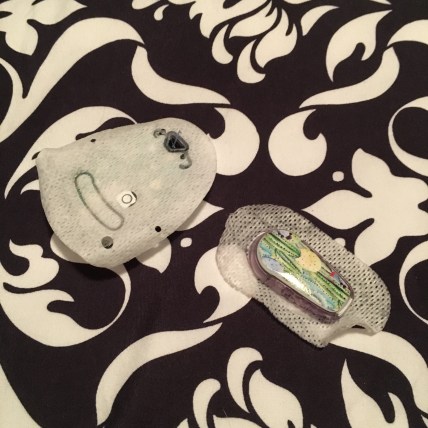
It should’ve been an easy, routine sensor change; alas, upon pressing the button on the insertion device, I let out a little pained squeak. Sensors don’t normally hurt, but every now and then, I get myself in a sensitive spot. And I definitely did this time around. Before popping the transmitter into the sensor, I noticed a bit of blood pooling underneath the sensor’s adhesive.
Pools of blood as I make my way to a wedding…do you get the red wedding connection now?
Fortunately, this tale has a happier ending than it did for much of the *spoiler alert* Stark family. Sure, my sensor kinda freaked out when it warmed up two hours later and measured blood instead of interstitial fluid, and it took like 12 hours for it to get its act together and display my readings accurately, but…it all worked out in the end. And thankfully, not a single person had any clue that there was a patch of blood on my belly throughout the wedding…it didn’t even stain through my dress.
For the first time in *literally* years, I took a device-free shower the other day.
AND IT WAS AMAZING.
Ta-ta for now, little friends.
Let me clarify that by device-free, I mean that I wasn’t wearing a pump or a CGM on my body. Both were due to be changed that evening, so with what can only be described as unadulterated glee, I peeled my Dexcom followed by my pod off my body before practically leaping into the shower.
It probably sounds funny, and perhaps a little dramatic or flat-out fucking weird, but those 15 minutes without a single medical device stuck to me were glorious. I wasn’t worried about accidentally knocking something off. I was free to scrub off the adhesive that had kept the devices stuck to my skin, and I felt oddly empowered – carefree, even – that I could enjoy one of the most mundane daily routines without needing to worry about my diabetes. Sure, for the duration of my shower, I wasn’t receiving my basal rate of insulin, but I really didn’t care because 1) I took a small bolus to compensate for it before I removed my pod and 2) I was more focused on doing this one little thing for myself to reclaim my body from diabetes devices, even if it was for a short window of time.
So you might argue that I had my first truly nekkid shower for the first time in forever. And it made me happy. A brief reprieve from diabetes is always welcome, and I’ll take it in whatever silly form I can get it in.
Low blood sugars in the middle of the night are far from pleasant. But they’re especially grating when you’re just trying to have a sleepover with your best friends and your CGM alarms loudly and urgently, rousing more than just me from a peaceful slumber.
Dammit, diabetes…you’ve done it again.
I don’t know how or why the low happened. I went to bed around 1 A.M. – we had stayed up late talking, drinking wine, and eating snacks – and at that time, my blood sugar was 156. You can’t get much better than that, and it felt even sweeter because we’d eaten pizza for dinner earlier in the evening.
I thought I’d be fine overnight. I might come down a smidgen due to the unit and a half I took to cover a slice of fabulous flour-less chocolate cake (utterly heavenly), but I made the assumption that I wouldn’t come crashing down.
I should know by now…never assume with diabetes.
So it happened at about a quarter of four in the morning – a witching hour, in my mind. I woke to the frantic buzz buzz buzzing of my CGM and quickly acknowledged it, then reached for my tube of glucose tablets. I did it as silently as I could, seeing as I was sharing the room space with my three gal pals. From what I could tell, my super slow glucose tablet chewing didn’t even cause my friends to stir. It seemed that I’d successfully managed to avoid waking anyone up, thank goodness.
I was just starting to fall back into a doze when the frantic low CGM alarm blared – BEEP beep BEEP beep BEEEEEEEEEEEP. Ugh! Upon hearing the first beep I snatched up my receiver, silenced the alarm, and scooped up my test kit and my phone. I tiptoed out of the bedroom from which we were all nesting to the living room, where I searched through my backpack for the Skittles I’d purchased earlier in the day…because that’s right, this 3:45 low blood sugar hadn’t been my first in the last twelve-hour window of time.
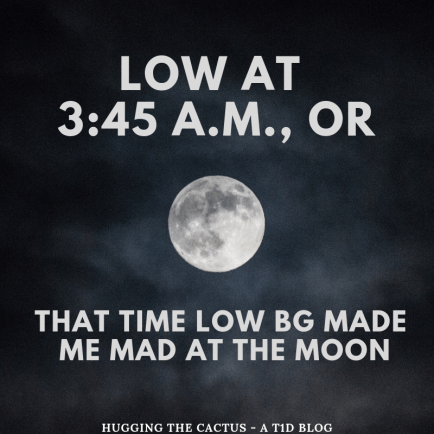
Low blood sugar in the middle of the night can make you feel weird things…such as anger towards the moon.
I plopped myself on the couch and started furiously chewing Skittles. I remember looking out to the sliding glass doors and to the balcony and to the parking lot and then finally up to the sky to see the moon shining brightly at me. It was positively dazzling, yet infuriating with its cheerful gleam. I wanted to yell at it to stop looking so happy. I muttered to myself, “this sucks,” and reclined a bit on the couch while I waited to come up from the low.
Everything was fine within 15 minutes. I was on my way up and could safely go back to bed. And again, I congratulated myself for not waking anyone up.
Or so I thought.
“Did anyone hear my CGM go off in the middle of the night?” I asked my girlfriends, approximately six hours after the incident when we were all awake and about to head out to breakfast.
“Yes! I was wondering what that loud, aggressive noise was,” said one. I cringed, an apology lingering on the tip of my tongue, when she continued with an “are you okay? Don’t worry about the noise, I fell back asleep soon after.”
I was grateful for her reassurance, but also for her concern. It felt good to know that ultimately, she didn’t give (apologies for language) two shits about the actual sound that my low blood sugar caused, she was just worried that I recovered from it okay and could get back to sleep soon after.
I smiled to myself. Hours before, I’d been cursing the moon for merely existing and dealing with an annoying, random low blood sugar. But now, I was cruising at a great morning BG and I was on my way to get a delicious breakfast with my gal pals. Diabetes has its moments, but I sure as heck appreciate it when it cooperates during the ones that matter most. So in hindsight, the 3:45 A.M. low was nothing more than a temporary annoyance, and I was just glad that the worst thing it did was interrupt my sleep (and mine alone) for 10 minutes rather than ruin actual precious time spent with my friends.
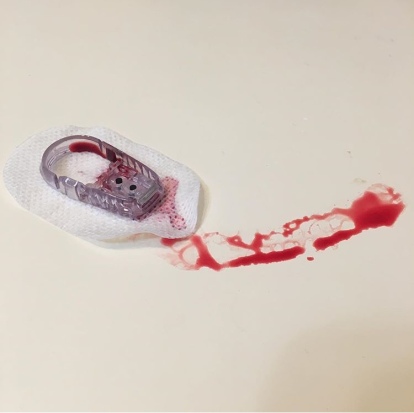
This blog post probably shouldn’t be read by anyone who gets squeamish when discussing blood or when viewing photos that show any amount of it…my apologies in advance for a bloody gross blog post, but I thought this was a good topic for discussion.
I placed the new Dexcom G6 sensor on my abdomen, hovering my index finger above the large orange insertion button. I pressed it, exhaling as I felt the minute needle pierce my skin’s surface. I looked down, and started to rub the adhesive in circles to make sure it was stuck, when I saw blood. Not just a drop, but a decent-sized pool forming beneath the sensor. Before long, just about the entire surface of the white adhesive was soaked in red.
Yeah, this was going to be a no-go.
It’s pretty rare for me to experience blood at the site of a Dexcom sensor. If I had to put a number on it, I would say less than 10% of my insertions draw blood. An even smaller amount – like, 2% – have caused me to bleed as much I did in the scenario described above. But I know I’m not alone in my bloody sensor experiences – it’s something that many other T1Ds who use a Dexcom have gone through.
There’s a bit of debate, though, that I’ve noticed in the past on Twitter threads and Instagram posts. What to do with a bleeder? Keep it and assume that it’ll read blood sugars normally? Or change it immediately and call Dexcom for a replacement?
Are bleeders readers? Or does it depend?
Do you think that bleeders are readers?
I’m going to go with…it depends.
Obviously, in that situation I described in the opening of this post, I decided that it wasn’t a good idea to keep the sensor on my body. There was too much blood and I didn’t trust that it would adhere well to my body. I didn’t know how long it would take for the blood to stop (only a few minutes, but still), and I couldn’t be sure that it wouldn’t mess up my readings. On top of that, I wasn’t trying to stain my clothing, if I could help it.
So in that circumstance, I did change my sensor right away, and was glad that the second try resulted in a much cleaner, blood-free insertion. I called Dexcom, explained what happened to the customer support representative, and got a replacement sensor mailed to me.
However, just about any other time I bleed upon a sensor insertion, it tends to be a minuscule amount of blood. I usually don’t even notice until it’s time to replace the sensor, and there’s a bit of dried blood left on the site. Other times, I’ll see small beads of blood forming underneath the spot where the transmitter snaps in. And there’s been a couple of occasions that I’ve bled a fair amount and been totally unaware of it until I caught my reflection in the mirror and noticed the blood staining the white adhesive. And in all of those cases, I’ve kept the sensor on for the full ten days, without noticing any discrepancies in my readings.
All that considered, in my inexpert opinion, I think that bleeders usually are readers and that they’re safe to continue wearing. Of course, there will be exceptions, like when there’s just too much blood to salvage the sensor. But every time I’ve kept using a bloody sensor, I’ve had the same amount of success with its functionality…so yes, I think that for me, bleeders are indeed readers.
You GUYS! I finally did it! I managed to restart my Dexcom G6. Sometimes, a little bit of trial and error pays off.
I restarted it by following the exact same steps that I linked to in my post from a few weeks ago. It involved five simple things:
Allowing my sensor to expire and remain on my body
Starting a new sensor session and choosing “no code” when prompted
Running the 2-hour warm-up session for only 15 minutes, then stopping it
Starting a new sensor session again, without a code (if you still have the code, though, that you used when you first inserted the sensor, then enter that into your receiver/app. But don’t make up a code or enter one from another sensor – just say “no code” if you don’t have it)
Allowing the 2-hour warm-up session to take place and receiving readings once it’s complete
The only thing that was different between this time and last time was the steps leading up to the restart. What do I mean by that? Well, for starters, I made sure I was attempting to restart a sensor that was giving steady, reliable readings – it seems as though it’s impossible to restart a sensor if it’s experienced any sort of error in the 10 days it’s been worn. So this means that when the sensor expired, I’d been receiving readings consistently up until the moment it expired.
That gap represents the sensor’s second round of two-hour warm-up.
That was the main difference. The location of the sensor I restarted was the back of my arm, which may or may not have affected the restart. I also restarted without using the sensor code, which I had set aside to use but somehow misplaced prior to the attempt. I have no idea if having or not having the code makes the restart more or less successful, but I do know for sure that I got three more full days of use out of my sensor. Cumulatively, that means that I was able to wear the same sensor for almost two full weeks! It might not seem like a lot to the marathoners who are able to make older G5 sensors last 3-4 weeks (I’ve even heard of people keeping the same one on and working for 6 weeks), but it’s exciting to me to have confirmation that it IS at least possible to restart a G6 sensor.
In terms of the sensor accuracy, dare I say that it was even MORE accurate on the second go?! I don’t have proof to really back that up, but honestly, it seemed that it was right on point with all my blood sugar readings (within 5-10 mg/dL). I don’t know how to explain that, but no complaints about it here.
The only other difference that was noticeable during the sensor extension was that I was prompted to calibrate at least every 12 hours. No big deal, since I had to do that when I was on the G5. But it caught me off-guard a bit at first, because on both my receiver and within the Dexcom app, a small blood drop icon was always visible onscreen (when actively checking the app or the receiver). Initally, it wasn’t too alarming because it was merely a reminder to calibrate twice daily. But then it became an absolute nuisance when weird “calibrate after __ A.M./P.M.” messages occurred multiple times per day. I would check my blood sugar at the appropriate time and enter the result into my app/receiver, only for it to be rejected and trigger another specific time-calibration message.
Screenshots of the pesky error message
Calibration rejected?!
To me, that indicated that my sensor’s second go-around ought to come to anend sooner rather than later. It was getting obnoxious to have to wait and check my blood sugar manually in order to appease the Dexcom messages that kept popping up. Plus, it came down to my comfort levels with wearing a sensor for a certain length of time – I just don’t love the idea of keeping the same one on for ages.
But this was my first taste of success with restarting a sensor, so naturally, I want more of the same! I’ll definitely continue to try to extend the life of future sensors, but remember, follow the steps above at your own risk. When in doubt, simply follow protocols as outlined by Dexcom. If I experience an even more successful sensor extension, you can bet that I’ll have all the details to share with you all here.






 Hugging the Cactus