This post was originally published on Hugging the Cactus on February 18, 2019. I’m re-posting it today with some updates because I recently noticed this post gets a LOT of clicks – this topic is one that many people are curious about it. Read on for my two cents on whether or not bleeders are readers, and note that I haven’t updated this because my experience with bleeders remains the same…
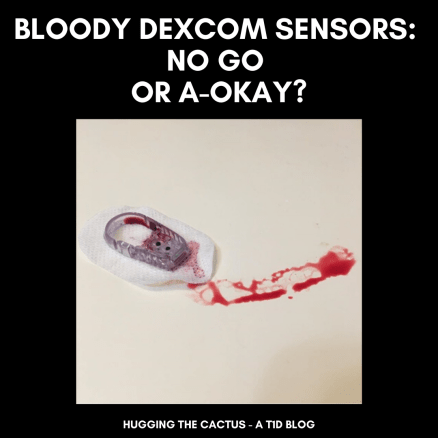
I placed the new Dexcom G6 sensor on my abdomen, hovering my index finger above the large orange insertion button. I pressed it, exhaling as I felt the minute needle pierce my skin’s surface. I looked down, and started to rub the adhesive in circles to make sure it was stuck, when I saw blood. Not just a drop, but a decent-sized pool forming beneath the sensor. Before long, just about the entire surface of the white adhesive was soaked in red.
Yeah, this was going to be a no-go.
It’s pretty rare for me to experience blood at the site of a Dexcom sensor. If I had to put a number on it, I would say less than 10% of my insertions draw blood. An even smaller amount – like, 2% – have caused me to bleed as much I did in the scenario described above. But I know I’m not alone in my bloody sensor experiences – it’s something that many other T1Ds who use a Dexcom have gone through.
There’s a bit of debate, though, that I’ve noticed in the past on Twitter threads and Instagram posts. What to do with a bleeder? Keep it and assume that it’ll read blood sugars normally? Or change it immediately and call Dexcom for a replacement?
Are bleeders readers? Or does it depend?
Do you think that bleeders are readers?
I’m going to go with…it depends.
Obviously, in that situation I described in the opening of this post, I decided that it wasn’t a good idea to keep the sensor on my body. There was too much blood and I didn’t trust that it would adhere well to my body. I didn’t know how long it would take for the blood to stop (only a few minutes, but still), and I couldn’t be sure that it wouldn’t mess up my readings. On top of that, I wasn’t trying to stain my clothing, if I could help it.
So in that circumstance, I did change my sensor right away, and was glad that the second try resulted in a much cleaner, blood-free insertion. I called Dexcom, explained what happened to the customer support representative, and got a replacement sensor mailed to me.
However, just about any other time I bleed upon a sensor insertion, it tends to be a minuscule amount of blood. I usually don’t even notice until it’s time to replace the sensor, and there’s a bit of dried blood left on the site. Other times, I’ll see small beads of blood forming underneath the spot where the transmitter snaps in. And there’s been a couple of occasions that I’ve bled a fair amount and been totally unaware of it until I caught my reflection in the mirror and noticed the blood staining the white adhesive. And in all of those cases, I’ve kept the sensor on for the full ten days, without noticing any discrepancies in my readings.
All that considered, in my inexpert opinion, I think that bleeders usually are readers and that they’re safe to continue wearing. Of course, there will be exceptions, like when there’s just too much blood to salvage the sensor. But every time I’ve kept using a bloody sensor, I’ve had the same amount of success with its functionality…so yes, I think that for me, bleeders are indeed readers.
This post was originally published on Hugging the Cactus on November 19, 2018. I decided to update it, since some of my thoughts and observations on the Dexcom G6 have changed over time due to more experience with it. Updated answers will be in parentheses and/or italics just below (and in some cases, next to) the original answers…
I’ve been lucky enough to have the Dexcom G6 CGM in my life for just over six months now. (It’s actually been about 2 years at this point!) In that time, many people in my life – both T1Ds and non-T1Ds – have asked me countless questions about my experience with the device. I thought it’d make sense to address some of the most commonly asked questions here, in the hopes that I can provide some insight to those who are curious about the Dexcom G6.
Question: Can the Dexcom G6 be restarted?
Answer: In my experience, no. I cannot get the G6 to restart like I could get my G5 to restart. But take my “no” with a grain of salt, here, because I know of other people who HAVE had success restarting their G6 sensor, making its life extend much longer than the 10 days guaranteed by Dexcom. I have only tried to restart the G6 once, with absolutely zero success, following the process outlined here. My advice to those who want to try to restart their G6 is to do so cautiously, and make sure you’re not trying to do so with the last sensor in your stockpile.
Since I initially wrote this, I WAS able to restart the G6 and did so “successfully” a handful of times. But in my opinion, it wasn’t worth it because 1) the sensor would stop reading blood sugars 2-3 days after restarting and 2) I can’t be sure that restarting doesn’t wear out my transmitter faster, which wouldn’t work to my benefit since I don’t know how to reactivate transmitters. My two cents is that while reactivating old Dexcom models like the G4 or G5 often worked well, the technology within the G6 simply isn’t meant for accurate restarting.
Question: Is it actually safe to take acetaminophen (Tylenol) on the Dexcom G6?
Answer: Yes! I’ve noticed that acetaminophen can be taken safely on the G6. I did not anticipate for it to be unsafe, seeing as it was advertised as one of the big improvements Dexcom made from the G5 to the G6. I’ve taken Tylenol a handful of times without noticing any issues with my CGM readings, but as always, be sure to monitor your blood sugar carefully and perform a manual finger stick check if your symptoms don’t match up with your CGM.
This is still absolutely true! I’ve yet to observe Tylenol, or any other drug really, having an impact on my CGM’s readings.
Question: I can’t get my Dexcom G6 sensor to stay put for the full ten days. How do you make it last?
Answer: There’s tons of ways you can help ensure your G6 sensor stays stuck on for the entire ten-day duration. I always make sure that my skin is completely dry before the sensor makes any contact with the site. Avoiding any excess moisture is key in helping it stay put. If I notice the sensor starting to peel around the edges after a few days of wear, then I use a Pump Peelz CGM adhesive to keep it in place. Those tend to work really well for me. In times of serious adhesive doubt, I also use Skin Tac wipes, which basically glue that sucker down. One last tip I recommend is to avoid sites that come into contact with a wide variety of surfaces. In other words, a sensor that’s placed on the abdomen may fare better than a sensor on the leg, because the odds of the sensor getting accidentally knocked off due to contact with clothing or other objects are lesser. You know your own body better than anyone, though, so trust your own judgment when it comes to CGM placement.
So at the time of publication, I hadn’t tried my leg as a site for the CGM. Now that I have, my answer changes a little regarding the “usability” of this site: I’ve had great success keeping the CGM sensor on my leg for the full 10 days without a single peel in the adhesive. Another tip I’ve picked up along the way is to contact Dexcom and ask for their free “overlay patches”, which they produce and that work just like any medical adhesive that Pump Peelz or GrifGrips manufacture especially for Dexcom products.
Oh hey, it’s me! In my purple cast showing off the G6. Fun fact: I don’t own an Apple watch – the one I’m wearing here was provided to me to wear just for the G6 promotional materials.
Question: Is sensor insertion truly painless?
Answer: For me, G6 insertion has been pain-free approximately 85% of the time. It’s stung slightly a handful of times, but I’ve found that it only hurts when I choose a site that’s not particularly fatty. That’s why I generally stick with my abdomen – either side of my navel – or the back of my arms for G6 insertion.
I stand by this estimate – once in a while, I get a site that’s a little more sensitive and there’s a slight sting, but nothing like it used to be for the G4 or G5. And now that I’ve added my thighs as sites into the mix, I’ve got more site rotation going on, which can help.
Question: Is the G6 really that much more accurate compared to the G5, or any other CGM on the market?
Answer: Yes and no. That may not be a very satisfactory answer, but I’ll explain why that’s my belief. Overall, the G6 seems to be more accurate for me than the previous Dexcom CGM models I’ve worn. Are the number always on point compared to what appears on my meter? No. Do I wear the Dexcom CGM to have an accurate picture of what my exact number is at a given moment in time? Kind of, but I also know that this isn’t totally realistic. After all, users of the Dexcom CGMs know that it measures blood sugar levels in five-minute intervals. It can’t give me a clearer picture of what my blood sugar changes are minute-to-minute. So with that in mind, I find that the G6 is really excellent for monitoring trends – seeing how rapidly my blood sugar is falling or rising, or seeing how it changes gradually over time. The patterns are more important to me than the precise numbers; at least, that’s how I feel in my current stage of diabetes management.
I can’t really speak to other CGMs on the market, such as the Freestyle Libre or Medtronic’s CGM. But what I can say is that I’ve heard less-than-stellar reviews about both. It’s important to remember, though, that they’re not meant to be the exact same as the Dexcom CGM. The Libre itself isn’t really continuous and can’t provide users with information until they chose to wave the receiver over the sensor. And as far as I’m aware, the Medtronic CGM communicates directly with Medtronic pumps, and I’m not sure how seamlessly the systems work together.
Bear in mind that when it all comes down to it, I’m answering these questions with my experience, and my experience alone, in mind. Dexcom is and will always be the number one resource to go to with any questions regarding their CGM devices. But hopefully, the information I’ve shared here will at least help someone who is curious about the G6 feel more motivated to seek additional information. I stand by the fact that it has revolutionized my own diabetes care and management, and though it’s far from being flawless, it’s still an invaluable tool to have incorporated into my daily routine.
I still have not tried any CGM model out on the market except for Dexcom CGMs. To this day, it’s what I know and what I’m most comfortable with, so I don’t anticipate that changing any time soon (though it’d be kind of cool to try another and compare it to my G6). The one thing that has changed is that I rely on my G6 readings a lot more heavily these days. I use a blood sugar meter to check my blood sugar only once or twice a day now, whereas a year and a half ago, I was using it at least four times a day. I’ve put greater trust into my G6, but I do remain cautious against the technology and always check with my meter when I’m not fully believing my G6’s readings.
So you want to try your first continuous glucose monitor. Or maybe you’re ready to leave behind multiple daily injections and switch to insulin pump therapy. Whichever diabetes device you’re looking to start using, there are some questions you’ll probably want to have answers to before decide that now’s the time to introduce new diabetes technology into your daily routine.
The following is a compilation of the questions that I thought long and hard about (literally for years) and that I wish I’d thought long and hard about before I made the transition to the OmniPod insulin pump.
Am I ready for it? It took me 17 years before I decided that I was ready to try an insulin pump. 17 freakin’ years!!! I spent most of that time being too afraid of introducing such a drastic change to a routine I’d had down pat for such a long period of my life. There are times when I wish I’d gone onto my insulin pump sooner, but ultimately, I’m glad that I wasn’t swayed by my family or doctors to go on it before I truly felt ready. By the time I started using my OmniPod, I had the maturity, responsibility, and emotional intelligence that I felt that I needed for an insulin pump.
Will I be able to afford it? Obviously, this isn’t a question that I wondered about when I was younger, but it’s one of the first things that comes to mind as an adult on her own health care plan. We all know that diabetes supplies are expensive, and it seems that the more technologically advanced something is, the more money that has to be forked over in order to obtain it. This isn’t right or fair, but it’s a simple truth and an important one to think about before choosing one pump or continuous glucose monitor over another.
Why do I want to start using it? I wanted to start using my OmniPod because my mom experienced great success when she started using it. And I decided to get a Dexcom CGM because I fell in love with the technology after undergoing a trial period with my endocrinologist. In both situations, I felt very much in control of my decision to start using these devices and I didn’t really listen to anyone else’s opinions. But I am very aware of the fact that social media and real-life friendships with other people with diabetes can often sway people in different directions. After all, if I saw a post on Instagram from a dia-influencer who was singing the praises of a Tandem T:slim pump, then I might seriously start thinking about switching to it (this has actually happened to me). But the bottom line is to think about the why – will this device enhance quality of life for me? Will diabetes be easier to manage with it? Will it help me achieve my A1c and/or blood sugar goals? Do I need to add something new to my routine because I’m feeling burnt out by doing things the same way all the time? Knowing why I wanted to use an OmniPod or a Dexcom CGM made me feel that much better during the whole process of learning how to use them – I felt like I had clear goals that would help me navigate the integration of these new technologies into my daily routine.
Me, being a goofball with my two favorite diabetes devices.
Will I be comfortable wearing it 24/7? This is a big one! Pods, pumps, and CGMs are very visible, and it can be jarring to go from being “naked” to having bumps and lumps underneath clothes that can get caught on doorknobs, chairs, and the like. Personally, the benefits of my OmniPod and Dexcom outweigh something like this which is a bit superficial, but that doesn’t mean it’s not something to think about. But it’s also worth thinking about comfort and what is least painful when it comes to insulin delivery, so that’s why this is an important question to ask.
Do I know anyone else using it who can provide feedback from a patient’s perspective? I’ve talked about this before, but I’m not sure when, if ever, I would have seriously considered using the OmniPod if my mother hadn’t tried it first. The fact that we both have diabetes has probably made us a little closer and strengthened our bond, so if there’s anyone’s opinion that I’m going to trust when it comes to something like this, then it’s hers. I can actually remember her first few weeks on the OmniPod – in which she learned a lot of valuable lessons – and how pleased she was with it once a few months with it elapsed. She taught me the ins and outs of the OmniPod when I started to use it, and I’d argue that her advice was more helpful than that of my diabetes educator. So I’d advocate gathering opinions from family and friends (if either is applicable) or the diabetes online community before going on a new diabetes device, in addition to the research component below…
Have I done enough research on it? …Like any smart shopper, it’s crucial to really consider all options and research them thoroughly, especially when it comes to the top contender. I definitely did not complete sufficient research before going onto the OmniPod or Dexcom; rather, I trusted that they were just right for me. If I were to switch to something else tomorrow, though, you can bet that’d I’d spend a lot of time scouring the web for every last bit of information on the device so I could make the most informed decision possible.
New diabetes technology can be both scary and exciting. But more than anything else, it can really make life with diabetes much more carefree, and I’m glad that in this day and age there are so many options available to people with diabetes that continue to be technologically impressive.
You settle into bed, ready to fall asleep after another long day.
But first, you check your blood sugar, just like you do multiple times every day.
Your glucometer reads 201.
Suddenly, you’re a little nervous to drift off to dreamland, because you just changed your insulin pod an hour earlier and you’re not quite sure if it’s the reason behind the high blood sugar.
You wonder: Could my blood sugar be high due to a miscalculation with insulin or carbs at dinner? Is it because of my stress levels? Is it because I’m dehydrated, or because I’m starting to get sick, or because my new pod’s site is on scar tissue, or because…?
Before long, you feel incredibly exhausted because you’re cycling through what seems like an endless list of reasons why you might have an elevated blood sugar and it has zapped you mentally.
You feel your eyelids grow heavy, and just before you go to sleep, you give yourself an insulin dose that should bring your blood sugar back down before long.
You experience a broken night of sleep.
When you read this, put yourself in the shoes of a person with diabetes…and this is just one night with the damn thing.
Since your Dexcom app is programmed to alert you when you’re over your high threshold for an extended period of time, it goes off, practically every hour, from 10 P.M. to 1 A.M.
Every time it happens, you wake up to the sound of your Dexcom alarm blaring in your ear.
You worry about waking up others in the household before you even begin to worry about your blood sugar.
You’re pretty sure it’s not a pod problem, since your blood sugar would probably be higher if that were the culprit, but you’re too damn tired to care about the cause at this time of night.
You bolus, go back to sleep, hear a high alarm, wake up, and repeat until finally your sleep stops getting interrupted by your Dexcom.
You get a few hours of broken rest.
You wake up at 6 A.M. and realize that, after all that, your blood sugar levels are still slightly elevated.
You’re pissed that your Dexcom was off by 40+ points, as confirmed by a fingerstick check.
You take more insulin, and force yourself to get up and out of bed because it’s time to start the day: Your diabetes is waiting for nothing, least of all you.
Just another night of not enough sleep and too much worry, thanks to diabetes.
Before I dive into this post, I want to make it abundantly clear that I don’t know the answer to this question. I’m not judging how anyone reacted during the recent Dexcom G6 outage, nor am I stating that there was a “right” or a “wrong” way to handle the situation. I merely think it’s important to ask ourselves questions like this when things don’t go according to plan with diabetes care/management.
Alright, now that I’ve got THAT out of the way…
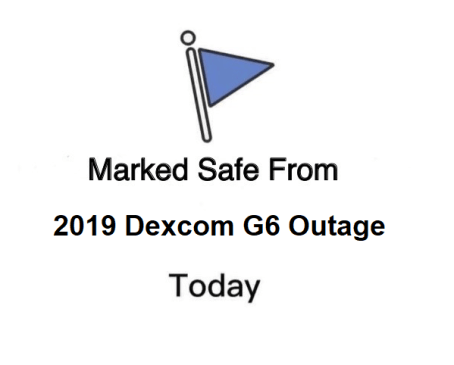
Many variations of this graphic have floated around the Internet in the days since the outage. I am not mocking anyone by posting it here; rather, I am using it as an example of ways in which we cope with diabetes difficulties. This example, to me, is an attempt at using humor to deal.
For the last several days, the DOC has been in a bit of a panic. And when I say “bit” I mean “a helluva lot”. That’s because the day after Thanksgiving, Dexcom Follow stopped working. This means that parents/caretakers who rely on the technology to monitor their child’s/loved one’s blood sugar levels were left in the dark. It sparked confusion, outrage, and downright fear, all of which only seemed to intensify over the weekend and into this week when the problem was only partially solved for most users.
Rather than coming together to support one another, the DOC swiftly divided into two camps: The first consisted of individuals who sought to gently remind others that this technology is still pretty new. It hasn’t even been around for two decades. That meant that for many years before then, people with diabetes were doing things the “old school” way, and getting by just fine. Doesn’t this mean that we should all be able to make it through unexpected technology blackouts, knowing that we have our blood sugar meters to fall back on?
The second camp was in a greater fury over the issue. This camp relied on the Dexcom G6 system because those within it simply didn’t know a life without the continuous glucose monitoring technology. For them, the outage was a bit like asking them to Google something without access to the Internet – it’s pretty much impossible, unless you’ve got an Encyclopedia handy. Oh, and it’s MUCH higher stakes, because people who don’t recognize symptoms of low or high blood sugar need this technology to work in order to stay on top of fluctuating blood sugar levels. Let’s not even get into how much is PAID for this expensive piece of medical equipment…one would argue that the high cost of supplies means that the technology should work at all times, no matter what.
If you’re like me, you can see that both of these groups have perfectly valid points. I’ve had diabetes long enough that I didn’t even use – and didn’t see the point in using – continuous glucose monitoring or insulin pumps until a few years ago. I took care of my diabetes the old fashioned way growing up: doing fingerstick checks multiple times per day, treating low blood sugars with 15 carbs then waiting 15 minutes, checking blood sugar levels about an hour after injecting insulin to make sure highs were coming down the way they should. This way of handling diabetes worked for me for a long, long time…throughout elementary, middle, and high school, right up to college.
Then I got a continuous glucose monitor (I believe it was the Dexcom G4) just before starting my freshman year of college. And I haven’t really been without a CGM device since then. It’s changed my life and helped me navigate adulthood with diabetes. Whenever I do experience periods of the technology not working the way it should, it’s infuriating because I feel like it’s not worth throwing away buckets of cash on it in those periods of inconsistency and inaccuracy.
But here’s what I’m wondering, as a result of this Great Dexcom G6 Outage of 2019…do we take this technology for granted?
Do we truly appreciate the times that it works the way it should?
Do we expect too much from something that, technologically speaking, still has a long way to go in terms of working perfectly?
Do we rely too heavily on continuous glucose monitors to provide us peace of mind when, in reality, they simply provide us with real-time updates of our blood sugar levels (i.e., it’s a stream of data)?
I don’t have answers to these questions. I can reflect on my own answers to them; furthermore, I can ponder how and why the DOC gets so divisive in these times where we should try to come together, listen to (and learn from) differing perspectives, and figure out what we can do to best support one another during trying times.
In my unofficial opinion: Yes, Dexcom G6 transmitters lose accuracy as they approach their expiration dates. And I’m not quite sure if I’m the only one who has noticed this, or if others have also experienced this frustrating phenomenon.
In my unprofessional opinion, yes!
I’m writing this after dealing with a dying transmitter that was showing its signs of decay by 1) losing connectivity with my receiver and 2) reporting inaccurate blood sugar readings. I’ve definitely narrowed the problem down to my aging transmitter, which (allegedly) had one session left before it was set to expire – everything else about this particular sensor session was standard procedure. And guess what else, everything about the entire 10-day session was obnoxious, because it was rare for me to have a single day with both accurate and consistent readings. Ugh!!!
I don’t know what’s more irritating – the signal loss or the inaccuracies. Actually, I DO know what irritates me more than anything else, and that’s the fact that the transmitters don’t seem to last for as long as they’re advertised. It’s just ludicrous, especially when you take into account how much these devices cost.
Many people with diabetes rely on this, and other forms of technology, to effectively manage diabetes. And when the technology can’t be relied on to do its job, we can’t perform our jobs as well. Diabetes is draining enough – is it too much to ask for technology to be trustworthy?
I want to change how I react to high and low blood sugars.
Why?
Well, I think that it’s about time for me to address my intense fear of low blood sugars, but I also feel that I need to reconsider how I define high blood sugar. I’ve been sick and tired of dealing with constant highs, sprinkled with a few lows, so all of that together has motivated me to come up with a plan.
My plan is two-fold:
Step 1) Change the low and high thresholds on my CGM from 80-180 to 75-160.
Step 2) Pay closer attention to my body’s cues when my blood sugar is low.
It won’t be easy to change how I react to low/high blood sugars, but I think it’s necessary.
The first step was extremely easy to follow. I modified the settings on the Dexcom app on my phone so I’m only alerted when my blood sugar goes above 160 and below 75. I’m hearing my Dexcom alarms more often as a result, but I’m also responding to these alarms more frequently, meaning that I spend less time overall above/below my goal blood sugars. It requires a little more work and patience, especially since I experienced a lot of stress and a cold in the weeks since I’ve made the change (stress + sickness = shitty high blood sugars), but I know that it will be worth the effort.
The second step is slightly trickier. I’m the kind of person who starts treating a low blood sugar early – I’m talking as “low” as 90. And that’s not low. Unless I have several units of insulin onboard or I’m about to do a moderate intensity workout, there’s no need for me to eat anything when my blood sugar is 90. But it’s easier said than done, because I actually do start to feel low blood sugar symptoms at 90 (not all the time, but definitely a chunk of it).
So I’m hoping that this is where step one will come in handy. I’ll use my new low threshold on my CGM to reorient my body’s recognition of low blood sugars. I’m also going to work on not panicking when I start to feel low…because I think that’s the real root of my problems. In the last several years, I’ve developed – for no apparent reason – a serious low blood sugar phobia. I do everything I can to avoid them at all costs, and that’s probably contributing to my recurring high blood sugars. And that is definitely not good.
I’m over living my life on a blood sugar roller coaster…so I’m looking forward to smoother sailing with this plan of mine. Updates to come, for sure.
When it comes to obtaining my diabetes supplies – life-saving pieces of medical equipment – I’ve discovered that it’s not a simple process. It’s not exactly like purchasing something on Amazon with a single click. Rather, it’s a convoluted, head-scratching, infuriatingly long procedure that apparently involves multiple calls to a variety of companies.
As of this writing, it took approximately 4 calls to my endocrinologist’s office, 12-14 calls to Insulet (the maker of my OmniPod insulin pump), 6 or 7 calls to Dexcom (for my CGM supplies), 2 calls to my health insurance provider, and 1 call to Express Scripts just to get everything all straightened away. These calls took place over the course of 2.5 months, and as they grew in frequency, so did my overall frustration and confusion.
The biggest headache was definitely caused by the lack of effective communication between Insulet and my endocrinologist’s office. I needed to get a new PDM, and Insulet’s job was to contact my doctor’s office and get a letter of medical necessity in order to get a PDM shipped out to me. Simple, right?
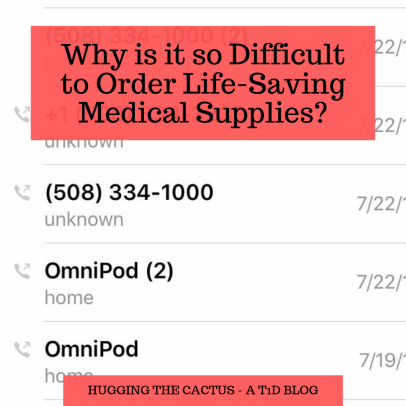
My call log looked like this for several days in July – so many phone calls to Insulet/OmniPod and to my doctor.
Far from it. About a week after I placed the order for the new PDM, I got an email from Insulet saying that my doctor’s office had failed to return their faxes. I was advised to contact them to determine the delay. When I did, I spoke with a receptionist who, despite my clear explanation of the issue, misunderstood what I was asking for and left me a voicemail to say that she didn’t know what Insulet was talking about seeing as their information showed that I had received a shipment from them. (For whatever reason, she thought I needed more pods, which I did have delivered around the same time that all of this was going on.)
After several more back-and-forth phone calls, I cracked the case wide open: Insulet had the wrong contact information for my doctor. While my endocrinologist hasn’t changed in about a decade, her office location has, and Insulet still had the old one. I felt like an idiot for not realizing this sooner, but then again…why was I the one who was jumping through so many hoops and making so many contact attempts in order to figure out what the hold-up was? It was absolutely ridiculous, but I certainly felt relieved – and satisfied – to have personally solved the mystery.
I wish I could say I had a better experience with Dexcom, but that proved to be similarly headache-inducing. I thought that I was set to receive my supplies after I’d signed a payment plan for a 90-day supply of sensors and transmitters, but when they didn’t show up after a month of waiting, I knew something was wrong. I called Dexcom and discovered that the order, for reasons unknown, just didn’t process, so I had to sign a brand-new payment plan and had my case assigned to a different customer service rep. I was pretty pissed off by the lack of communication, but the one silver lining was that I’d already managed to pay my deductible in full (ha, no surprises there), so my Dexcom supply order would cost me less. Again, it was unbelievable that I never got an update from the company regarding my order’s status, but I did feel a sting of pride in myself for getting it all worked out on my own.
I don’t know why everything about this process is so agonizing. But what I do know for sure is that it seems that the only person I can count on to get my supplies ordered properly, in the end, is myself.
One of the most frustrating things about having diabetes is feeling like you’re finally understanding it, perhaps even mastering it, only for it to lash out at you and make you feel like you don’t know shit about it.
It’s when you do everything right – check and treat accordingly, eat properly, exercise sufficiently – and still get it wrong when your blood sugars don’t behave the way they should.
I really hate when this happens, but I loathe when it happens on vacation…which is exactly what happened to me last week when I was in Maine for a few days.
Things started going awry shortly after I woke up (if only I knew then that I was in for a DAY!!!). I ate breakfast and my blood sugar swiftly started to rise. But I didn’t panic, because that’s what I wanted to happen. We’d be walking all around town for part of the morning and most of the afternoon, so I wanted my blood sugar to be on the higher side so that my chances of dropping dramatically in the heat were lower. I made the right call – soon after we got downtown, I noticed a diagonal down arrow on my Dexcom app. Things were headed in the right direction…or so I thought.
Not long after I spotted the diagonal arrow, I started to feel a little low-ish. Not super shaky or anything, but just a bit disoriented. I decided to pop into my favorite candy store to fill a small bag with treats so I had something sugary to munch on that would prevent a bad low blood sugar.
Those were mistakes number one and two…not consulting with my CGM again before eating candy, and going to town on it because it was CANDY and it tasted delicious.
Within a half hour, I was rising up, up, and up. I took a small amount of insulin to correct it, not wanting to be too aggressive and risk a real low. But as I walked around the amusement park with my boyfriend and his family, I just wasn’t coming back down like I thought I would. I lingered in the mid-200s for much of the early afternoon, and by the time we stopped for lunch, I was rage-bolusing to bring my numbers down faster. I even chose a lower-carb lunch option in the hopes that it’d stave off another high blood sugar, but nope, the BG gods were not in my favor that afternoon. As we moved from the amusement park to a brewery (a drastically different change in locale, I know), I bolused once again, and then noticed that the batteries in my PDM were low.
And that actually wasn’t a problem, because I was prepared enough to have spare triple A batteries on me – thank goodness! I took the old ones out, popped the new ones in, and waited for my PDM to come back to life. And it did…but it asked me to input the month, day, and year.
Dammit. THAT’S never a good sign. I entered the information and the system accepted it, and then my pod failed immediately after, which meant that I had to ditch the brewery and the group of people that I was with to get back to the house we were staying at as quickly as possible to put a new one on.
It doesn’t get much more irritating than that.
(Later, I discovered that my PDM’s internal battery was going, and that this behavior would occur every time I replaced the triple A batteries. Needless to say, I’m awaiting a new PDM from Insulet, because it’s just not smart to continue using an aging PDM.)
By the end of this day of turbulent blood sugars and unpredictable medical device malfunctions, I was mentally beat. I felt like I’d been thrown into the roughest of ocean waters and forced to tread water for hours in order to keep my head above the surface. It’s exhausting to know that, when it’s all said and done, I was really trying to do the right things and take care of myself. I was SO DANG PREPARED with those extra triple A batteries, for goodness’ sake! But man, diabetes…just when I think I know it better than anything else, it throws me for a loop and I remember a saying from Professor Mad-Eye Moody of the Harry Potter series (of course I’m talking about Harry Potter again, don’t act surprised): CONSTANT VIGILANCE. I’ve got to be aware of my diabetes at all times. I’ve got to know how to react and when so that my diabetes will remain in my charge – not the other way around.
I’m taking a departure from a “traditional” blog post today to tell you, my dear readers, that you should consider celebrating a special holiday with me today: National Selfie Day! Before you roll your eyes at the mere idea of that, please keep reading to learn how participating will help support students with diabetes.
Dexcom has partnered with a nonprofit that is very important to me – The College Diabetes Network (CDN) – to help put some focus on the diabetes community and raise money. They’ve created the #SensorSelfie social media campaign to encourage people with diabetes to take photos of themselves proudly donning their Dexcom sensors.
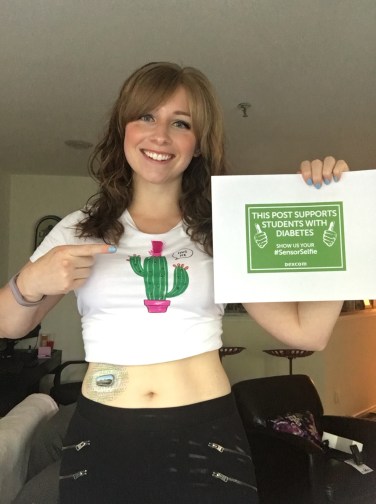
Here’s my #SensorSelfie, which wouldn’t be complete without my cactus shirt.
But what exactly do you need to do in order to take part in the campaign? There’s four simple steps to follow today, June 21st:
Take a picture showing off your Dexcom sensor
Post the photo to your Facebook and Instagram pages
Use the hashtag #SensorSelfie and tag @Dexcom
Tell ALLLLLL your diabuddies to do the same
For every post that uses #SensorSelfie today, Dexcom will donate $1 to CDN. Can you imagine how much money could be raised if you got all the T1Ds you know to participate?
If you’re looking for some more information on this social media campaign, click this link. Otherwise, what are you waiting for? Get to snapping, posting, and tagging!





 Hugging the Cactus