My CGM Sensor Ripoff

Oh, the Dexcom G6. You have no idea how much I simultaneously love and hate you. I love you for your painless insertion, increased accuracy, acetaminophen-blocking capabilities, and your sleeker profile. But I effing loathe you for having communication issues with the sensor on days 9 and 10 of wear…that is, if you even last that long on my body. You have serious sticking issues, old pal. Your adhesive tends to be a bit of a ripoff – both literal and figurative.

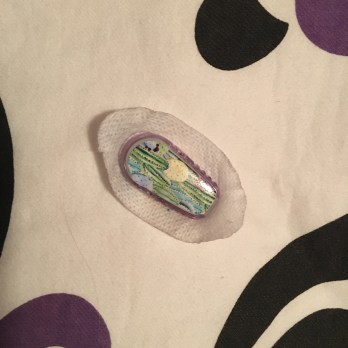
You see, I was just trying to roll over into a more comfortable position in the middle of the night when you decided right then would be the ideal time to just fall off my arm, prompting me to go from blissfully snoozing to wide awake and angry in less than 10 seconds. Way to go! It pissed me off because it happened with very little effort. I would’ve understood if I had scratched or touched it in any way, but all I had done was flip from sleeping on my left side to my right. Not fair and definitely not the ideal way to wake up.
ef4e931e-5cd8-4c1f-bb2e-ce3976cdf552
The ripoff sensor in question.

I wish I could say it was a one-time occurrence, but no, it happened a couple months ago. Again, it was the middle of the night and again, it was ripped off prematurely. I think that in both cases, I still had at least another three or four days of use before it was due to be changed. And even before these two middle-of-the-night ordeals, I had trouble with a freshly inserted sensor that was peeling all around the edges. What the heck is going on with Dexcom G6 adhesiveness?

Maybe this is a sign that I need to start using something in addition to an alcohol swab each time I change a sensor. Perhaps Skin-Tac or more regular usage of Pump Peelz/Grif Grips will prevent future sensor ripoffs. But still can’t help feeling ripped off, because this never really happened when I was using my G5 sensors.

The small mercy in this situation is Dexcom customer service. Kudos to their team for being understanding and willing to replace my not-so-sticky sensors…but I wish I could say that I had more faith in a G6 sensor’s ability to stay on my body for the full 10 days that it was intended to.

Favorite Things Friday: My Fave Carb Counting App

One Friday per month, I’ll write about my favorite things that make life with diabetes a little easier for me.

I’ve written about my favorite diabetes-specific apps in the past, but I’ve also got a couple others that aren’t directly related to T1D that are mainstays on my iPhone. But there’s one in particular that 1) on the surface, has nothing to do with diabetes and 2) has been exceedingly helpful at giving me guidance when it comes to carb counting in certain situations. So without further ado, let me share the name and what I like so much about the app itself.

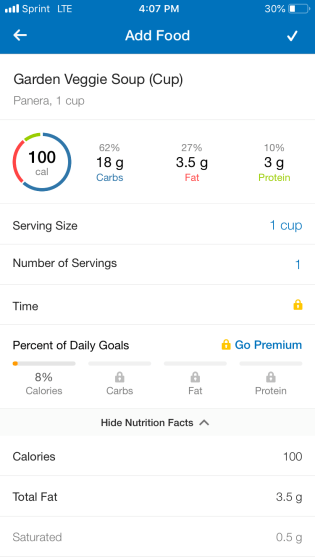
MyFitnessPal is my carb-counting app of choice. As the name implies, it’s an app that revolves around, well, fitness. It’s designed to provide users with a comprehensive log that tracks activity levels, food/water intake, nutrition information, and so much more. Initially, I downloaded it to keep a record of my daily calorie consumption and quickly discovered that it wouldn’t only help me figure out what dietary changes I needed to make, but it would also improve my carb counting.

67bb54cc-4790-41aa-b88b-7266f7d46d91
An example of MyFitnessPal in action – if I wanted to know the carb count in a cup of veggie soup from Panera, I can find it by simply searching for it within the app. 

How? The app contains a comprehensive food library – sort of like the one that’s built into the OmniPod PDM, except this one is much, MUCH more substantial. It includes foods from fast food restaurants, regular dining establishments, grocery stores, and just about any other place you could order food from. It’s been an absolute godsend in situations in which I’m really struggling to figure out how many carbs are in a dish that I’d like to order/buy. It’s not an end-all, be-all source of information – just like anything else in life, the food library isn’t flawless – but it’s a solid starting point when it comes to foods I’m less familiar with.

In addition to showing me how many carbs I consume in a day, the app has also taught me how logging simple information related to diabetes can go a long way in establishing trends, such as how different foods affect my blood sugar. The act of logging or writing something down can sound like a pain, but really, the few minutes it takes each day is worth the knowledge it ultimately imparts.

Readers, what about you? Do you use carb-counting apps? If so, which ones and why? I’m especially curious in hearing feedback from anyone who uses Figwee – I’ve heard nothing but praise for that one. Drop a comment here, tweet at me, or leave a note on my Instagram page about your favorite carb-counting app!

What is “Controlled” Diabetes?

There are few word pairs I loathe more than “controlled” and “diabetes”.

How the hell can diabetes be “controlled”? It’s not a video game to be played with a controller. There’s no character selection or “start” button. And it most definitely can’t be shut off with the flick of a switch.

On the contrary, it’s my opinion that diabetes is a bit of a wild beast that can’t simply be tamed. It doesn’t care if you follow the same routine every single day – it’ll act up for no damn reason whenever it pleases, much to the dismay of a person dealing with it.

Diabetes will do what it wants, when it wants. It will wake you up in the middle of the night because of a low blood sugar. It can throw your whole day off track because you make your plans around it. Diabetes itself comes with so many variables, between the devices and the effectiveness of medication, that it can oscillate no matter how hard you try to keep it steady. How can something like that possibly be under control? People with diabetes, like me, are given tools that are intended to help manage diabetes, certainly, but we have yet to receive something that allows us to influence it completely.

get lost in stockholm

If I had to take a stab at guessing what people thought “in control” diabetes looked at, it would be more than just the “perfect” flat-lined CGM graph. It would be more than going to bed each night and waking up every morning, having just enjoyed an uninterrupted, sound night of sleep. It would be more than having the freedom to make spur-of-the-moment choices regarding a daily routine or diet.

But for now, I’ve accepted that my diabetes is something I manage rather than control…but I also accept my refusal to let it control me.

Restarting the Dexcom G6: Attempt #2

“If there’s a will, there’s a way.” This statement totally describes the Diabetes Online Community (DOC) and its collective determination to find workarounds when it comes to extending the life of certain diabetes devices.

In November, I briefly wrote about my first stab at restarting my Dexcom G6, which was completely unsuccessful. So why bother going through with a second attempt at it? Two reasons: 1) I know that other T1Ds have been able to triumphantly restart the G6, and 2) I know that there are multiple methods out there that people have used in order to do so.

I wasn’t necessarily on the hunt for a method I hadn’t tried yet, but I stumbled across one when I was scrolling through my Instagram feed a few weeks ago. Shout-out to Leah (Instagram handle: @the.insulin.type) for sharing her technique, which you can view for yourself by clicking this link.

You’re probably wondering whether it worked for me, so let me cut to the chase and give you a super annoying answer: yes and no. I restarted the G6 according to Leah’s process, but received the “Sensor Error: Temporary issue. Wait up to 3 hours.” message, which resulted in graphs with sporadic gaps created by a lack of readings. That message popped up at least three or four times over the next 48 hours, before the “sensor failed” message notified me that I had to put a brand new sensor on and finally get rid of the restarted one.

This means that attempt #2 went better than my first try at restarting a sensor, but it was far from the flawless restarts that I know other people have experienced.

I haven’t given up hope, though. I do think that I’ll achieve success, eventually, after some more trial-and-error. I do have my theories that might explain why this didn’t go as well as I wanted it to, and it has to do with the following factors:

  • I restarted my sensor on day eight of wear
  • The sensor error message was on my receiver when I began the restart process

Next time I try this method, I want to see if it makes any difference to let the sensor expire naturally on the tenth day of wear. And if that doesn’t work, I want to at least give it another shot when the sensor and receiver are communicating properly and there are no error messages causing interference.

All in all, the experiment wasn’t a total failure. I did manage to extend the sensor’s life by about six hours – it was due to expire at 2 o’clock in the afternoon on the tenth day of wear, but the sensor didn’t fail completely until about eight o’clock that night. So TECHNICALLY speaking, I got a bit more usage out of it…but then again, those six hours (and probably slightly more than that) got wiped out by those stretches of time that I was dealing with sensor errors.

As I work through more restart attempts, rest assured that I’ll post about them so hopefully someone else will learn a method that works for them, too. But remember…restart your Dexcom G6 at your own risk. It’s not guaranteed to restart or, even if it does, to be accurate.


What I Wish my Dog Knew About Diabetes

Clarence the Shetland Sheepdog joined our family almost one year ago, and he’s brought us nothing but joy and unconditional love ever since then. Well, he’s also brought us a few headaches (when he has been disobedient) and some panic attacks (when he chews things he shouldn’t), but that’s besides the point – this little puppy is adored beyond his own comprehension and he fits in perfectly with us.

8cb626a0-dec1-4e6d-be41-679aa86ebee3

But something else that Clarence doesn’t quite understand is…yep, you guessed it, diabetes. Realistically speaking, he’s probably totally unaware of it – the bliss of being a dog. I wish he had some sort of grasp of it, though, because there are times when it gets in the way of my interactions with him. How? I’ll get really specific here with my list of things that I wish my little peanut knew about diabetes:

  • I wish that he knew my pods/CGM sensors aren’t chew toys! He doesn’t often grab at them, but every now and then, he’ll notice them on my body and nudge them curiously. And since he’s a mouthy guy (being a puppy and all), he has tried nipping at them a couple of times, which always leads to me yelling at him and shoving him away. So it’d be nice if he could recognize that these things help me stay alive and shouldn’t be played with.
  • I wish that he knew how to fetch glucose tablets or raisins for me/my mother when we’re dealing with low blood sugars. Man, that’d be awesome! But knowing Clarence, if I tried to train him how to do that now, he’d be way more interested in drinking or eating anything intended to remedy a low blood sugar, rather than bringing it over to me or my mom.
  • I wish that he knew how to react, period, to any sort of blood sugar “event”. For example, if we’re out walking and I need to take a break in order to check my levels, it’d be swell if he could wait patiently rather than tug on the leash to keep the walk going. I can’t blame him, he’s just trying to continue his exercise. But if he knew WHY we had to stop – if he could understand in any sort of way – that would be hugely helpful.
  • I wish that he knew that, on the occasions that I can’t play with him, it’s not because I don’t want to. It’s because I HAVE to do something medically necessary, whether it’s change my pod or bolus for dinner, that takes my attention away from him.
  • And I wish that he knew that sometimes, diabetes can take a mental toll on me and my mom, and that there’s not much he can do about it besides continuing to be his sweet self. It’d certainly be convenient for him to realize that his impish side just exacerbates things when one of us is dealing with a stubborn high or shaky low.

That’s my list of wishes, but there’s one thing that I never had to wish for or teach Clarence when it comes to diabetes…and that’s his innate ability to bring us comfort in just about every situation with his mere presence.

I’ve said it before and I’ll say it again: Attaboy, Clarence.

14 Words That Describe how Glucose Tablets Taste

My shaky hands pop the lid off the tube of glucose tablets. A puff of dust floats out from the tube – a cloud of sugary residue from the ten tablets stacked neatly on top of each other. A friend watches me remove two tablets. Unfazed by their gaze, I chew them quickly, knowing that they’ll kick in soon and give my blood sugar the boost it needs. My friend waits until I’ve put the tube away to ask me what glucose tablets taste like.

AFD07A7A-7992-4D25-80CA-04D808E51080
Ugh…I can practically taste the sugar dust by just looking at this photo.

This exact scenario has unfolded a number of times over my years with diabetes. I don’t know why people are so fascinated by glucose tablets and their taste. Is it because I describe them as sugar pills? Is it something about the way they’re encased so tidily and conveniently? Do the pastel colors look especially appetizing to some people?

Whatever the case may be, I’ll put an end to all the curiosity surrounding glucose tablets right here, right now. Here’s my list of 14 words that describe the taste and texture of “magic sugar pills”, also known as glucose tablets.

  1. Chalky.
  2. Dusty.
  3. Artificial.
  4. Dry.
  5. Fruity.
  6. Slightly medicinal.
  7. Mildly acidic.
  8. Sweet.
  9. Brittle.
  10. Dissoluble.
  11. Powdery.
  12. Tangy.
  13. Stale.
  14. Crumbly.

So based on those descriptors…do they still sound remotely appetizing…? Probably not. Though I didn’t use the most flattering language to describe them, they’re still responsible for saving my butt – literally – countless times. And for that, I can forgive glucose tablets for not being the most palatable things.

Memory Monday: My Lowest Low Blood Sugar

One Monday per month, I’ll take a trip down memory lane and reflect on how much my diabetes thoughts, feelings, and experiences have unfolded over the years. Today, I remember…

…the lowest low blood sugar that I ever experienced. So low, in fact, that I never actually found out how low it reached. Scary stuff.

lost in stockholm

Admittedly, my memory’s a little fuzzy when it comes to recollecting what exactly happened, but here’s what I remember: It was my sophomore or junior year of high school. I woke up in the morning and checked my blood sugar – or so I thought. In reality, I think I imagined checking my blood sugar, or perhaps I went through the motions of doing it without actually getting a reading.

Regardless, I made my way down the stairs and into the kitchen, where I encountered my mother. I told her that I wanted “special cake”.

I remember her looking at me with worried eyes and asking me what I was saying. All I can recall is that I asked for special cake two or three more times before getting totally frustrated with her. How could she not understand my request for Special K cereal?

That’s right, in my stupor, I thought I was saying that I wanted Special K cereal for breakfast. But I didn’t realize that my low blood sugar was causing me to slur so badly that my words weren’t coming out clearly.

I vaguely remember my mom’s panicked reaction as she figured out that I must be experiencing a low. I think she asked me what my blood sugar was, and when I couldn’t tell her because I didn’t remember, she knew it was time to force some orange juice down my throat. I was conscious for that, but it’s like it was erased from my memory – I have no recollection of drinking the juice or what the moments after that were like.

I wound up going to school late that morning, only to have to go home less than halfway through the day. My low “hangover” was so bad that I felt nauseous in my classes and couldn’t concentrate on the lessons.

Obviously, I fully recovered from the incident. Even though my memory is shoddy at best when it comes to remembering the whole experience, the mere fragments that I can recall are enough to make me scared to ever go through something like that again. It’s a reminder that diabetes can be terrifying, but living with it is a reality that I have no choice but to accept – fears and all.

Rolling with the Punches (and the High Blood Sugar)

I just wanted a nice dinner out on New Year’s Eve…but diabetes – or rather, my diabetes devices – had another plan in mind.

You see, that’s when my brand-new pod decided to stop working properly, leaving me no choice but to deliver insulin via syringe in the middle of a fancy restaurant.

Hence, my unamused expression in the following photo.

6f688e1c-9a27-4e6a-a48a-1b781f3c1285.png
Shooting up like the diabadass I am.

On the one hand, it was irritating to deal with, especially since my malfunctioning pod delivered high blood sugar to me in lieu of insulin. But on the other hand, what else could I do except roll with the punches? After all, it was New Year’s Eve – the final night of 2018. I was NOT about to allow diabetes to ruin it for me.

So I left my frustration and dismay at my high blood sugars at home, where I first realized there might be something wrong with my pod, and did my best to maintain an upbeat attitude throughout dinner. Yes, I was checking my CGM often, but I also remained engaged in conversation with my dinner companions (thanks for that meal, Mom and Dad). I took comfort in the knowledge that I was prepared with a vial of insulin and syringes should my blood sugar stay high in spite of my aggressive boluses. And when it did indeed climb into the 300s, I calmly set down my fork and knife, fished a syringe and my insulin from my backpack, drew up eight units, and rolled up my sleeve to inject right then and there. It felt kind of weird to “shoot up” in the middle of the dining establishment, but I didn’t have much of a choice. I could’ve gone to the restroom, but I knew that the lighting would be bad – at least I could have assistance from my parents by injecting at the table (again, thanks Mom and Dad, the cell phone lights came in clutch in this situation).

As I pushed down on the syringe’s plunger, I vaguely wondered whether any restaurant patrons were watching and wondering what the actual eff I was doing. I was self-conscious about it for a hot second, but I got over it because I knew I was doing what needed to be done.

I was rolling with the punches, high blood sugar and all, because it was the best thing to do for my body and my mind. Plus, I really got to stick it to my diabetes by refusing to let it spoil my night, and to me, that was much sweeter than the cheesecake my mom and I split for dessert.

The Possible Pod Failure, or “Do You Hear What I Hear?”

Judging by the title of this blog post, you might assume that I’m rewriting yet another Christmas song to make it about diabetes. Well, I’m here to tell you that is false – no more Christmas carol transformations for me! (At least, not until Christmas 2019.)

Rather, this post is all about an odd, kind of silly thing that happened to my mother and I when we were out on a walk with Clarence, my parents’ dog.

We both heard a high-pitched beeping coming from…somewhere.

We exchanged glances and my mom asked me if I heard that sound. I nodded, and we both sighed as we fished through our pockets for our PDMs. That’s because we both just knew that one of us was experiencing a pod failure, and that the pressing of a couple buttons would reveal who was about to become extremely annoyed.

FDCCCFA1-DF84-4419-9CCA-B332C4CCF0AD
My walking buddies, moments after the false alarm.

But both of our PDMs indicated that our pods were working just fine. Bemused, she told me that sometimes her PDM won’t recognize the pod failure right away, and it will be the pod itself that emits the beep-of-dread. So I started lifting up layers of my heavy winter clothing to see if my pod was making the sound, while she briefly stopped walking to listen closer to her pod.

After our careful scrutiny, we determined that…

…the beeping sound was actually someone using a weed whacker or some other piece of lawn-care equipment in the distance. Oops.

We continued our walk, chuckling a bit about it while Clarence pranced along in between us. It was a relief to know that we wouldn’t have to scramble home so one of us could take out insulin and a fresh pod to apply as soon as possible.

What’s the point of sharing this little vignette? To show that diabetes is such a significant part of our lives, always one of our first thoughts, even in the most mundane cases. It also illustrates how volatile diabetes can be – just like that, a random beep can change the course of the day and determine your next series of actions.

Just some food for thought, all triggered by a (literally) false alarm.


My T1D New Year’s Resolutions

New Year’s resolutions are kinda tacky and silly, especially ones that are broken three weeks into a new year. Even so, I like to put a little thought into how I can better myself when a new year begins, so I guess I’m the sort of person who (somewhat grudgingly) tries to make a commitment to some form of self-improvement around this time each year.

Happy New Year!
Are you making any New Year’s resolutions?

While some of my resolutions are going to remain private, I’d like to share others – specifically, my diabetes-related ones – here because I think it’ll be the first step in making them a reality in 2019. Here’s what I’ve come up with so far, along with some explanations why they’re my goals so far:

  1. Improve my A1c – This is kind of a cop-out resolution, because let’s face it, a better A1c will never not be a goal of mine. I’m in a better range now than I was a few years ago, which is a huge accomplishment in itself. But I know I can do more, and I have the drive and desire to get myself below 6.5 this year.
  2. Make time for more IRL T1D hangouts/meet more T1Ds – I can’t be the only one who scrolls through Instagram and feels pangs of jealousy when I come across photos of large groups of T1Ds hanging out, right?? A significant percentage of these hangouts are the result of T1D conferences, which I’m rarely able to attend. They either cost too much money or take place at an inconvenient time, so I’m forced to miss out on some valuable face-to-face time with people who understand me in a unique way. It’s definitely a bad case of FOMO. As a result, I want to be proactive and try to arrange more meetups in my area in the next year.
  3. Incorporate more self-care into my routine – 2018 was such an insanely busy year. I felt that, at times, I was getting pulled into too many directions and had obligations to so many people that I could barely keep up, let alone make any time for myself to catch my breath. I had days here and there where I could sneak away for an hour or two and treat myself to a massage or exercise at the gym, but I really didn’t have a single mental health day in which I unplugged from everything and kicked back. Though I know 2019 will be just as hectic, if not more than 2018, I still want to be sure to make more time for myself, even if it is just for five or ten minutes a day.

Now that I’ve shared my resolutions, I feel like that will hold me accountable for making a good-faith effort in accomplishing them. And I also feel that they will be good things for me to write about throughout the next year, so I can keep both my audience and myself informed of my progress.

And with that, it’s my final blog post of 2018. Here’s to 2019, a year that will be filled with plenty more content from Hugging the Cactus. To you, my readers, I wish you a healthy and happy new year!