I’ve decided to take a break from continuous glucose monitoring. This means that for an undefined period of time – maybe 3-4 days, a week, or a few weeks – I’m not going to wear my Dexcom G6 CGM.
Initially, I wanted to give myself a break because I was just burnt out from wearing it all the time and feeling so dependent on it. But as I started thinking about more, I realized that there were some other really great reasons for me to take a break from my CGM:
1 – I wanted to wear one less device. It can be tough to wear two medical devices 24/7. Sometimes I get super self-conscious of them. Other times they just aren’t comfortable to wear, such as when I roll over one the wrong way when I’m sleeping at night. So it’s nice to feel a little more free with one less device stuck to my body at all times.
2 – I was sick of the constant data feed. All those alarms going off whenever I cross my high or low threshold are straight up annoying!!! I know I could just turn them off on my CGM receivers, but the point of them (for me) is to try to maintain as tight of a control on my numbers as possible. But now that I’m intentionally not wearing my CGM, I’m realizing how much I appreciate the reprieve from all that buzzing and beeping.
There’s lots of reasons to take a break from continuous glucose monitoring, but sometimes one is enough.
3 – I have some new blood glucose meters to try. The only way that I can really put my new meters to the *test* (lol) is to use them – and goodness knows that I have very little desire to do manual finger stick checks when I’m wearing my CGM.
4 – I’d like to hold myself more accountable. I rely on my Dexcom heavily at all times. I look to it before I start exercising, before I eat something, before I do anything, really. I bolus using the data it provides and trust it implicitly. But I’ve recognized that by developing this habit, I’ve become lazy. I don’t measure out food as much because I figure that if I bolus too much or too little for it, I can just watch what my Dexcom tells me and treat from there. It’s kinda sloppy, in my humble opinion, so I’m trying to put more of the trust back in myself for my diabetes monitoring.
5 – I’m trying to reacquaint myself with my body’s cues. Before CGM technology, I was really good at recognizing high and low blood sugar symptoms…but then I started using a CGM and found myself reacting to highs and lows (e.g., treating them prematurely), even if I didn’t feel those high/low symptoms. So I want to retrain myself so I can make sure I never lose that ability, because I think it’s important to know exactly how my body alerts me to various blood sugars, rather than depending solely on a piece of technology to do it for me.
I’m re-upping this post that I initially published on February 5, 2018, because…it’s happened again. I have another broken bone! This time, it’s a chauffeur’s fracture, which is just a fancy way of saying that I have a break along my radius due to falling on my outstretched hand. Fortunately, the X-ray process went much smoother this time around – I actually referred to this blog post so I could remember exactly what I was told about insulin pumps and X-rays! Hopefully, this helps other people who had the same questions as me.
“You have to remove your insulin pump before we can take your X-rays,” the technician said to me. I stared at him, and responded point-blank, “What? No, I can’t take it off.” I tried to hide the panic in my voice, but it quavered as tears stung my eyes.
“Well, let me check our insulin pump protocol…” his voice trailed off as he left me in the dark room with my right arm held up in the air in an attempt to mitigate the throbbing sensation going up and down my forearm.
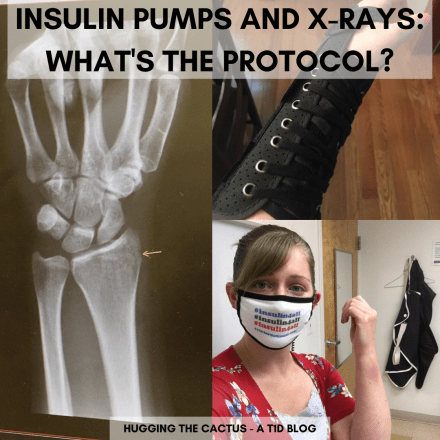
Here you can see an X-ray that shows where the break is (follow the yellow arrow), me looking miserable in the doctor’s office but still rocking my #insulin4all face mask, and my lovely new brace which I get to wear for 3-6 weeks.
When I fell and broke my ulna a couple weeks ago, my insulin pump was one of the last things to cross my mind as I was shuffled from doctor to doctor and one medical facility after the other. All I could concentrate on was the injury – how severe was it? Would I be able to work? Could I keep up my exercise regimen? Was I going to need surgery? My diabetes, for once, was far from my thoughts.
But this instantly changed when I went to get an X-ray. When the technician told me that I’d have to remove my pump, I wanted to shout at him, “No! If I do that, my blood sugar will skyrocket! You can’t expect me to do that!” It was hard to keep calm, and my emotions were already running amok due to the chaos of the morning so far. So even as I tried to fight the tears, a couple escaped and ran down my cheeks. When he came back into the room, the X-ray technician’s expression changed. He looked at me empathetically.
“It’ll be okay. Come on, let’s call your endocrinologist. We’ll see what she has to say and get this all figured out.”
Twenty minutes later, after a series of phone calls and a few accidental hang-ups, we received confirmation that I could, indeed, wear my pump for the X-ray. The nurse practitioner who I spoke with at my endo’s office said that it was safe as long as I wore the protective vest. “It’s really only a problem if you’re going in for an MRI or a CAT scan, because those involve magnets,” he told me.
Once I got off the phone, I ran over to the X-ray technician and explained it to him. He smiled at me and said, “Got it. Let’s get these pictures over with – you’ve already had quite a day so far.”
I nodded and thanked him for his patience. He was right, I was overwhelmed from the events of the day – it wasn’t even noon yet – but in hindsight, I’m glad that the technician didn’t try to fight me when I said I couldn’t remove my pump. His willingness to hear me out was huge. It’s not easy to be your own advocate in a high-stress situation like that. But I’m proud of myself for speaking up and getting the answers we needed. Everything worked out in the end – well, except for that pesky broken-bone bit.
I shared that my company is offering a sweet new benefit for its associates with diabetes: a free blood sugar meter with free refills on test strips and lancets as the need arises.
While I waited for my new meter to come in the mail, I did some research on it. I was excited to learn that it would be a back-lit, full-color touchscreen. It looked sleek and modern, and I was impressed that it seemed to have a lot more features compared to my blood sugar meters of yore (I still remember having to use a giant droplet of blood and waiting an entire minute for my blood sugar results to appear on a very clunky screen…oh, the 90s). I couldn’t remember the last time I was so pumped about a new piece of diabetes equipment – my anticipation for this Livongo meter was hiiiiiiiigh.
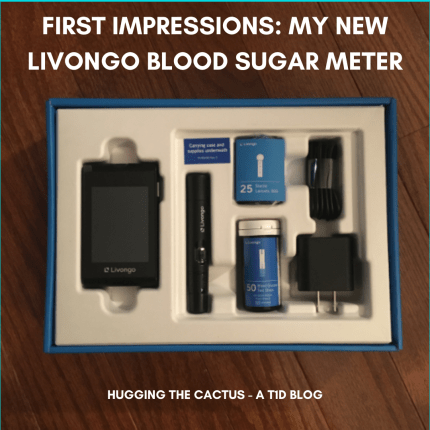
Here she is – my new Livongo meter which I’ve dubbed Livi. Because what else would you call it?!
So when it arrived, I eagerly checked out all of its features. It is, indeed, a well-designed meter – though a bit heftier than I was expecting. Maybe I’m too used to the lightweight nature of my Verio IQ, but this Livongo meter almost feels like a chunky smartphone. It’s not as big as my OmniPod PDM, but it’s in that neighborhood.
I was more so surprised by the test strips – they looked and felt huge compared to my Verio strips! They reminded me of the test strips I used in the first few years of my diabetes diagnosis.
I admit that I didn’t have the patience to read through the instruction manual, I just jumped right into my first blood sugar check. After all, once you’ve used any one type of meter, it’s pretty easy to figure out how the rest of ’em work: insert a test strip, prick a finger, swipe blood onto the strip, and wait for results.
That’s exactly how this meter works, with one caveat. Once I inserted the test strip into the machine, I got a message that notified me the machine was “checking” the test strip. Uhh…checking for what, exactly? I’m not really sure, but the “check” took about 3 seconds before a soft-pitched beep let me know that I could put my blood onto the test strip.
So I did, but I was mildly bemused by the actual amount of blood the strip needed – it felt like it needed more than my Verio strips. I have no idea if this is truly the case, but there is distinct design difference between the strips beyond the hardiness of the Livongo strips, which are not only at least double the size of Verio strips but also feature a vertical line for the blood sample rather than a horizontal. It’s slightly trickier to get just the right amount of blood onto the strip, and I admit that I’ve wasted 2-3 test strips at a time with the Livongo machine so far because I was unsuccessful in getting enough blood on the strips.
Anyways, once I applied blood to the strip, I noticed that the machine didn’t countdown to my results – it merely informed me it was processing them. My very first check with the Livongo was high, in the 250s, and I was yet again surprised when I received an actual message along with my results.
“Your blood sugar is high. Did you know that exercising after meals can help lower blood sugar?”
(I should note that the meter knew I’d just eaten dinner because once it makes the blood sugar result available, you notify the machine whether or not this result was before/after a meal/snack, and then you let it know how you feel – you can select from a handful of pre-loaded options.)
I was taken aback by the message because, well, of course I knew that my number wasn’t great, and I’ve always known that exercising after meals can help bring blood sugar down. This meter is kind of funny, because as I continue to use it, it populates a bunch of different messages depending on my blood sugar in a given moment. Sometimes I get a “kudos”, other times I get random facts about nutrition like, “did you know that spinach is a great source of potassium?” Maybe if I was a newly diagnosed person with diabetes who didn’t know much about nutrition or ways to improve blood sugar levels, I’d find these tidbits of advice more helpful, but for someone as experienced as me they come across as both funny and judge-y.
Since receiving the meter, I’ve used it to check my blood sugar dozens of times and I’m still formulating my opinion on it in terms of its accuracy, usability, design, and overall appeal. I’ll say this for now: I’m intrigued enough by the meter and its ability to immediately send blood sugar data to a cell phone/computer via Bluetooth. It’s definitely one of the most high-tech blood sugar meters I’ve ever used and the touchscreen does make it kind of fun to play around with.
I plan on making a video to better showcase the actual experience of doing a blood sugar check with the Livongo, and I’ll have a full review available in the coming weeks. Stay tuned!
Unexpectedly, I just obtained two brand-new blood sugar meters.
I’ve been a fairly loyal user of my OneTouch Verio IQ meter for about a decade now – that’s a longer relationship than the one I’ve had with Dexcom or OmniPod. It’s been mostly a loving relationship: From the beginning, I was a big fan of its sleek design, back-lit screen, and overall portability/usability. It grew a little more tumultuous over the years, though, as I noticed occasional, unprompted system shutdowns and questioned the overall accuracy of the device.
So I decided it was time to explore other options.
I brought this up to my endocrinologist during my very brief appointment with her a few weeks ago, and she let me know that a new Verio meter would be available soon. She said that she would set one aside for me when she received the shipments and that I could come and pick it up whenever I was back at the clinic.
Coincidentally, my gynecologist’s office is just down the hall from my endo, so I was able to pull double duty the other day and pick up the new meter right after my annual appointment with the lady doctor!
I was super excited to have a new meter, and even happier that it would take the same strips as my old meter. But there was one problem that I discovered when I got home…
…the meter I received isn’t the fancy-schmancy one just released by OneTouch.
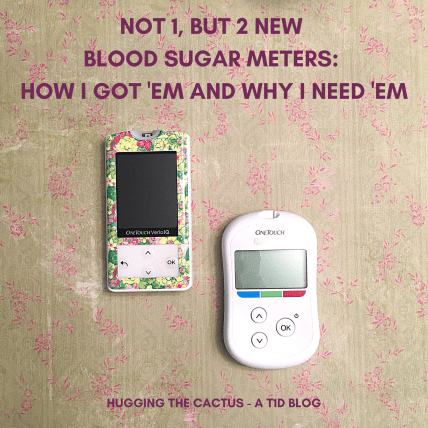
My old Verio IQ (left) with my new Verio Flex (right)
Instead, it was a generation after my Verio IQ – so it’s still a new one – though it’s decidedly less impressive, technology-wise, compared to its counterpart. It’s the OneTouch Verio Flex, and it’s very compact, but lacking a charging port (it runs on a battery) and the back-light that I loved so much about my Verio IQ.
Before I could fret too much about this minor disappointment – I can’t get too upset over a meter that I didn’t have to pay for – I noticed a letter on the counter addressed to me from my company.
I opened it up and was pleased to discover that my company is partnering with Livongo to offer a free blood glucose testing kit, free lancets/strips, and free coaching to all qualified associates with diabetes.
Talk about a sick benefit, right?!
I followed the instructions enclosed with the letter and within five minutes, my information was submitted to the Livongo website and my kit was on its way to me.
I’m totally pumped about this meter and this new program that my company set up. I’ve never heard of them doing anything like this before, and it will be a huge relief to know that I won’t have to worry about ordering blood sugar testing strips (or the associated cost) any time soon. But the meter itself sounds so dang cool, too – it has a full-color touchscreen! The meter actually knows when you’re running out of test strips and will remind you to reorder them!!! I’ve never heard of anything like that before, so I’m eagerly awaiting its arrival and can’t wait to check out all the features.
The one thing you might be wondering about these two new meters is…why the heck would I need them since I already have a Dexcom G6 that monitors my blood sugars 24/7???
There are two reasons: It never hurts to have back-ups and my Dexcom isn’t always accurate.
Let’s say that tomorrow, my Dexcom transmitter fails. Suddenly, I’d be without any blood sugar readings and I’d have to rely solely on my meters for blood sugar checks.That’s why it’s incredibly important to have functioning meters at all times, because you just never know when you may have no choice but to use them.
To compound that, my Dexcom doesn’t always work the way it should. Sometimes, I receive sensor errors and it doesn’t work properly for hours. Other times, I feel symptomatic of low or high blood sugars and my Dexcom doesn’t report them, so I resort to doing a finger stick check to verify the accuracy of my Dexcom’s readings.
It’s easy to understand, then, why I think it’s crucial to have at least one spare blood sugar meter. I may have come across these two new ones suddenly and fortuitously, but I welcome their addition to my diabetes toolkit and can’t wait to “test” ’em out (and of course, blog about ’em).
The summertime season is in full swing, and now that it’s here I’m thinking of the various ways my diabetes is more pronounced in the warmer weather. It’s much more visible, leading to many more questions, but what are the cues that give it away to others? I thought of four…
Visible sites. Shorts-and-t-shirts weather makes it much harder to place pods or CGM sensors in discrete locations. And if I’m going to the beach? There’s no way that I can even attempt to hide my devices. That’s probably why I make them even more obvious with…
…Pump and sensor art. I’ve written about Pump Peelz and GrifGrips in the past – they make adhesives and skins that are specially designed to fit pods, PDMs, pumps, meters, and more. The products they make are truly little works of art for diabetes devices, and I like to make sure all of mine are decked out in the summer months so I can show off tech that’s not only functional, but also stylish.
I’m looking forward to donning my best beach-y Pump Peelz on what I hope will be many trips to the beach this summer.
Gadget tan lines. Or if you’re like me, it’s more like sunburn lines. That’s because each summer, without fail, I somehow manage to neglect the space around my pod or my sensor, so when it’s time to remove it, there’s a huge red circle around the perimeter of where the device was situated. Maybe this year I’ll actually learn my lesson and take the time to apply sunscreen properly so I can avoid the very not-cute sunburn circles.
Travel coolers. This is probably the least obvious sign of diabetes in the summertime, but to those in the know, coolers meant to protect insulin are pretty recognizable compared to regular coolers. Whether it’s a Frio cooling pouch or another brand of insulin cooler, people with diabetes tend to carry these throughout the summer months in order to prevent insulin from spoiling due to heat exposure.
Have you ever been in such a hurry to do something within a certain period of time that it works to your disadvantage?
I guess there’s a reason why they say haste makes waste…
…especially when haste results in accidentally whacking your insulin pump off your arm.
I was reminded that this can happen the other day when I had my friend over for some socially distant hang time. Just because we had to stay six feet apart during her whole visit didn’t mean that I had to be a bad host, though, and I was in a rush to bring some Goldfish for us to snack on while we sat in the sun outside. I flitted about the kitchen, grabbing the bag, a plate, and some napkins to bring out with me. When I went to open the sliding door that would take me from the kitchen to the porch, I gave myself just enough room for my body to slip through it sideways.
I should’ve walked through the opening slowly; rather, I dashed through it like I was about to cross the finishing line of a race – and my pod was suddenly, a bit violently, ripped off my arm in the process.
“ArrrrrRRRRRRRggggHHHH!” (I think that’s a pretty good approximation of the sound that I made when it happened.)
I wish I had a picture of how absurd it looked to have my pod dangling from my arm; alas, taking photos wasn’t a priority of mine in this situation.
My friend, alarmed by my animalistic emanation, asked if I was okay. I came to my senses and calmly explained that I’d just knocked my pod off my arm, and she looked on in horror as she saw it dangling by an adhesive’s thread on the site.
“Doesn’t that hurt?!” she asked in dismay.
I reassured her that no, while the actual sensation of the pod ripping off my skin didn’t hurt, it definitely stung that I was now forced to replace it even though it had only been in use for less than a full day. It sucks when I can’t use my supplies to their fullest extent because each time something like this happens, there’s a dollar amount attached to what I’m wasting, and what’s worse is that I can’t blame it on anyone or anything except myself.
Ah, well…a fresh pod was applied and no harm was done in the end. But next time I try to enter or exit that sliding door, you can bet I’ll be a lot more careful when I do so.
Life with diabetes can be the opposite of a cakewalk. In fact, it can be so frustrating at times that I seriously consider ripping my hair out due to sheer agitation.
When thinking about the things that drive me nuts about diabetes, I came up with a list of 8 occasions in which I come this CLOSE to losing my freakin’ marbles:
1. When low blood sugars refuse to come up…
2. …And when high blood sugars refuse to come back down.
I’m considering these first two as separate list items because the scariness of a lingering low and the frustrating nature of a stubborn high can be two very different types of “GAAAAAAAAHHHH!” But both can be especially suck-y when you feel and know that you’ve been doing everything right to treat them without experiencing the expected results.
3. Pod and CGM sensor failures.
Oooh, any sort of device failure can be so exasperating any time of day. But they’re worse when they happen at inconvenient times, such as in the middle of the night or during an important conference call. All diabetes technology should work flawlessly at all times, but that’s not always the reality that we live in.
4. Inaccurate results.
I can’t stand when my blood sugar meter or my CGM report false readings. Sometimes, I’ll check my blood sugar two times in a row just to see how close both readings are to one another, and it makes me want to throw my meter across the room when I see that they’re off by 20+ points. Once, I had a reading that was off by more than 50 points! That makes a major difference in how much insulin I give myself in that moment in time, so inaccurate results can really derail my blood sugars for hours after.
I’m sure you can imagine how entertaining the search results were when I looked up images to go with this blog post.
5. Folds in the adhesive.
Whenever I apply a fresh sensor or a pod, I try to be super careful and make sure that the adhesive sticks smoothly…but despite my best efforts, that doesn’t always happen. Folds in the adhesive are far from the worst thing in the world, but they do make it more difficult for my devices to stick on for the full length of time that I need to wear them, and I usually end up having to add tape around them to reinforce the hold. More tape = more folds = more irritation!!!
6. Unexplained blood sugars.
Anyone with diabetes has been there, done that. You could follow the exact same routine from one day to the next, even eating the same foods at the same times, and get totally different blood sugar results. Or maybe you thought that you bolused perfectly for a meal, only to find out hours later that you’re much higher or lower than you anticipated. Whatever the reason behind them may be, unexplained blood sugars are just obnoxious.
7. Screeching alarms.
Speaking of things that are obnoxious, let’s talk about wailing OmniPod or Dexcom alarms for a hot second. There’s nothing like a resounding BEEEEEEEEEEEEEEEEEEEP to ruin your day!
8. The INSANE costs of our supplies.
Undoubtedly, the thing that most makes me want to rip my hair out when it comes to diabetes is the cost of supplies. I’ve blogged more and more recently about the criminal cost of insulin – since the 1990s, the cost of insulin has increased over 1,200% (!!!) – and I’ll continue to do so until EVERYONE with diabetes can afford this life-saving medication. We never asked for diabetes to happen to us. But it did. And the fact that many people with diabetes have to make sacrifices in order to, well, survive, is simply not okay, and the most infuriating thing about living with this chronic illness.
When people notice my OmniPod insulin pump, the first question that I’m asked is “what IS that?”
After I explain that it’s my insulin pump, and it’s called a pod, the second question I’m asked is some variation of “how long does it last?”
The canned answer that I provide is something about having to change it every three days, because that’s how the OmniPod is advertised.
But I’ve used this pump for years now and never bothered to really test this three-day limit. I’ve known for a long time that my pod works a handful of hours after the expiration alarm starts chiming, but I wasn’t sure about exactly how many hours I had before a pod expired for good.
So, the other day, I decided to find out.
Have you ever made your pod last longer than 3 days? If so…are you a wizard???
My pod expired at 10:22 A.M. Since I prefer to change my pods in the evening, I figured it was the perfect time for this little experiment, assuming that the pod really would last me for the majority of the day.
And, well, it did! At 10:22 on the dot, the pod beeped at me to notify me that it was expired. And in the six hours after that, it would alarm every hour (on the 22nd minute) to remind me, time and time again, that it was expired. In the seventh hour – beginning at 5:22 P.M. – my PDM started chirping at me on and off every 15 minutes or so. First it was because I was running out of insulin, but then it was to really get the point across that my pod was expired!
I was determined to use every last drop of insulin in the pod, though, so I bolused for my dinner around 5:45 and I was pleased to discover that I got my full dose of insulin without any issues. As I was cleaning up after dinner, that’s when the signature OmniPod BEEEEEEEEEEEEEEEEEP went off as one blaring, unceasing alarm. I checked the time: 6:22 P.M.
So there was my answer. An OmniPod can last precisely 80 hours after you initially activate it for the first time (or in other words, 8 hours after you receive the first expiration message)…as long as it still has insulin in it. It’s definitely something good to know for sure now, because in the future, it might come in handy and help me avoid wasting precious insulin.
This post was originally published on Hugging the Cactus on February 18, 2019. I’m re-posting it today with some updates because I recently noticed this post gets a LOT of clicks – this topic is one that many people are curious about it. Read on for my two cents on whether or not bleeders are readers, and note that I haven’t updated this because my experience with bleeders remains the same…
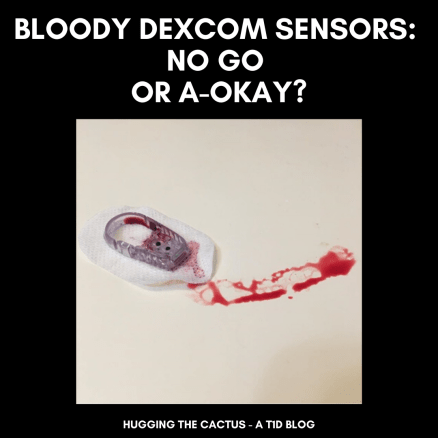
I placed the new Dexcom G6 sensor on my abdomen, hovering my index finger above the large orange insertion button. I pressed it, exhaling as I felt the minute needle pierce my skin’s surface. I looked down, and started to rub the adhesive in circles to make sure it was stuck, when I saw blood. Not just a drop, but a decent-sized pool forming beneath the sensor. Before long, just about the entire surface of the white adhesive was soaked in red.
Yeah, this was going to be a no-go.
It’s pretty rare for me to experience blood at the site of a Dexcom sensor. If I had to put a number on it, I would say less than 10% of my insertions draw blood. An even smaller amount – like, 2% – have caused me to bleed as much I did in the scenario described above. But I know I’m not alone in my bloody sensor experiences – it’s something that many other T1Ds who use a Dexcom have gone through.
There’s a bit of debate, though, that I’ve noticed in the past on Twitter threads and Instagram posts. What to do with a bleeder? Keep it and assume that it’ll read blood sugars normally? Or change it immediately and call Dexcom for a replacement?
Are bleeders readers? Or does it depend?
Do you think that bleeders are readers?
I’m going to go with…it depends.
Obviously, in that situation I described in the opening of this post, I decided that it wasn’t a good idea to keep the sensor on my body. There was too much blood and I didn’t trust that it would adhere well to my body. I didn’t know how long it would take for the blood to stop (only a few minutes, but still), and I couldn’t be sure that it wouldn’t mess up my readings. On top of that, I wasn’t trying to stain my clothing, if I could help it.
So in that circumstance, I did change my sensor right away, and was glad that the second try resulted in a much cleaner, blood-free insertion. I called Dexcom, explained what happened to the customer support representative, and got a replacement sensor mailed to me.
However, just about any other time I bleed upon a sensor insertion, it tends to be a minuscule amount of blood. I usually don’t even notice until it’s time to replace the sensor, and there’s a bit of dried blood left on the site. Other times, I’ll see small beads of blood forming underneath the spot where the transmitter snaps in. And there’s been a couple of occasions that I’ve bled a fair amount and been totally unaware of it until I caught my reflection in the mirror and noticed the blood staining the white adhesive. And in all of those cases, I’ve kept the sensor on for the full ten days, without noticing any discrepancies in my readings.
All that considered, in my inexpert opinion, I think that bleeders usually are readers and that they’re safe to continue wearing. Of course, there will be exceptions, like when there’s just too much blood to salvage the sensor. But every time I’ve kept using a bloody sensor, I’ve had the same amount of success with its functionality…so yes, I think that for me, bleeders are indeed readers.
This post was originally published on Hugging the Cactus on November 19, 2018. I decided to update it, since some of my thoughts and observations on the Dexcom G6 have changed over time due to more experience with it. Updated answers will be in parentheses and/or italics just below (and in some cases, next to) the original answers…
I’ve been lucky enough to have the Dexcom G6 CGM in my life for just over six months now. (It’s actually been about 2 years at this point!) In that time, many people in my life – both T1Ds and non-T1Ds – have asked me countless questions about my experience with the device. I thought it’d make sense to address some of the most commonly asked questions here, in the hopes that I can provide some insight to those who are curious about the Dexcom G6.
Question: Can the Dexcom G6 be restarted?
Answer: In my experience, no. I cannot get the G6 to restart like I could get my G5 to restart. But take my “no” with a grain of salt, here, because I know of other people who HAVE had success restarting their G6 sensor, making its life extend much longer than the 10 days guaranteed by Dexcom. I have only tried to restart the G6 once, with absolutely zero success, following the process outlined here. My advice to those who want to try to restart their G6 is to do so cautiously, and make sure you’re not trying to do so with the last sensor in your stockpile.
Since I initially wrote this, I WAS able to restart the G6 and did so “successfully” a handful of times. But in my opinion, it wasn’t worth it because 1) the sensor would stop reading blood sugars 2-3 days after restarting and 2) I can’t be sure that restarting doesn’t wear out my transmitter faster, which wouldn’t work to my benefit since I don’t know how to reactivate transmitters. My two cents is that while reactivating old Dexcom models like the G4 or G5 often worked well, the technology within the G6 simply isn’t meant for accurate restarting.
Question: Is it actually safe to take acetaminophen (Tylenol) on the Dexcom G6?
Answer: Yes! I’ve noticed that acetaminophen can be taken safely on the G6. I did not anticipate for it to be unsafe, seeing as it was advertised as one of the big improvements Dexcom made from the G5 to the G6. I’ve taken Tylenol a handful of times without noticing any issues with my CGM readings, but as always, be sure to monitor your blood sugar carefully and perform a manual finger stick check if your symptoms don’t match up with your CGM.
This is still absolutely true! I’ve yet to observe Tylenol, or any other drug really, having an impact on my CGM’s readings.
Question: I can’t get my Dexcom G6 sensor to stay put for the full ten days. How do you make it last?
Answer: There’s tons of ways you can help ensure your G6 sensor stays stuck on for the entire ten-day duration. I always make sure that my skin is completely dry before the sensor makes any contact with the site. Avoiding any excess moisture is key in helping it stay put. If I notice the sensor starting to peel around the edges after a few days of wear, then I use a Pump Peelz CGM adhesive to keep it in place. Those tend to work really well for me. In times of serious adhesive doubt, I also use Skin Tac wipes, which basically glue that sucker down. One last tip I recommend is to avoid sites that come into contact with a wide variety of surfaces. In other words, a sensor that’s placed on the abdomen may fare better than a sensor on the leg, because the odds of the sensor getting accidentally knocked off due to contact with clothing or other objects are lesser. You know your own body better than anyone, though, so trust your own judgment when it comes to CGM placement.
So at the time of publication, I hadn’t tried my leg as a site for the CGM. Now that I have, my answer changes a little regarding the “usability” of this site: I’ve had great success keeping the CGM sensor on my leg for the full 10 days without a single peel in the adhesive. Another tip I’ve picked up along the way is to contact Dexcom and ask for their free “overlay patches”, which they produce and that work just like any medical adhesive that Pump Peelz or GrifGrips manufacture especially for Dexcom products.
Oh hey, it’s me! In my purple cast showing off the G6. Fun fact: I don’t own an Apple watch – the one I’m wearing here was provided to me to wear just for the G6 promotional materials.
Question: Is sensor insertion truly painless?
Answer: For me, G6 insertion has been pain-free approximately 85% of the time. It’s stung slightly a handful of times, but I’ve found that it only hurts when I choose a site that’s not particularly fatty. That’s why I generally stick with my abdomen – either side of my navel – or the back of my arms for G6 insertion.
I stand by this estimate – once in a while, I get a site that’s a little more sensitive and there’s a slight sting, but nothing like it used to be for the G4 or G5. And now that I’ve added my thighs as sites into the mix, I’ve got more site rotation going on, which can help.
Question: Is the G6 really that much more accurate compared to the G5, or any other CGM on the market?
Answer: Yes and no. That may not be a very satisfactory answer, but I’ll explain why that’s my belief. Overall, the G6 seems to be more accurate for me than the previous Dexcom CGM models I’ve worn. Are the number always on point compared to what appears on my meter? No. Do I wear the Dexcom CGM to have an accurate picture of what my exact number is at a given moment in time? Kind of, but I also know that this isn’t totally realistic. After all, users of the Dexcom CGMs know that it measures blood sugar levels in five-minute intervals. It can’t give me a clearer picture of what my blood sugar changes are minute-to-minute. So with that in mind, I find that the G6 is really excellent for monitoring trends – seeing how rapidly my blood sugar is falling or rising, or seeing how it changes gradually over time. The patterns are more important to me than the precise numbers; at least, that’s how I feel in my current stage of diabetes management.
I can’t really speak to other CGMs on the market, such as the Freestyle Libre or Medtronic’s CGM. But what I can say is that I’ve heard less-than-stellar reviews about both. It’s important to remember, though, that they’re not meant to be the exact same as the Dexcom CGM. The Libre itself isn’t really continuous and can’t provide users with information until they chose to wave the receiver over the sensor. And as far as I’m aware, the Medtronic CGM communicates directly with Medtronic pumps, and I’m not sure how seamlessly the systems work together.
Bear in mind that when it all comes down to it, I’m answering these questions with my experience, and my experience alone, in mind. Dexcom is and will always be the number one resource to go to with any questions regarding their CGM devices. But hopefully, the information I’ve shared here will at least help someone who is curious about the G6 feel more motivated to seek additional information. I stand by the fact that it has revolutionized my own diabetes care and management, and though it’s far from being flawless, it’s still an invaluable tool to have incorporated into my daily routine.
I still have not tried any CGM model out on the market except for Dexcom CGMs. To this day, it’s what I know and what I’m most comfortable with, so I don’t anticipate that changing any time soon (though it’d be kind of cool to try another and compare it to my G6). The one thing that has changed is that I rely on my G6 readings a lot more heavily these days. I use a blood sugar meter to check my blood sugar only once or twice a day now, whereas a year and a half ago, I was using it at least four times a day. I’ve put greater trust into my G6, but I do remain cautious against the technology and always check with my meter when I’m not fully believing my G6’s readings.






 Hugging the Cactus